Keyboard Control for Chrome™
插件截图
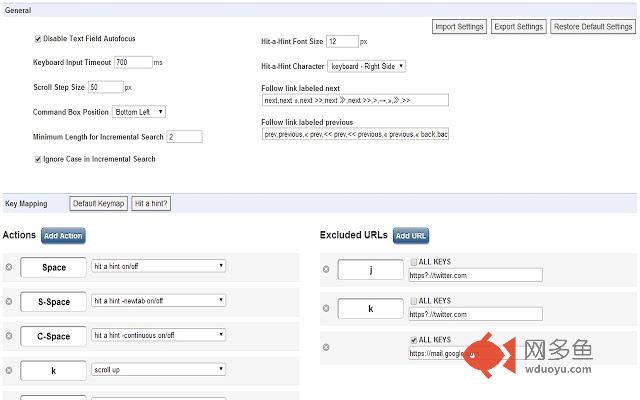
插件概述
Keyboard shortcuts for navigation and control. Vim like bindings.插件详情
keyboard shortcuts for navigation and control.Vim keybindings extension.
No ads, no spyware.
v9.3
Deprecate and Remove KeyboardEvent.keyIdenfitier (Chrome 54)
v9.2
execute scripts
alias mode (localstorage -> bookmarks)
v8.8 bugfix (scrolling)
v8.3 multi link opener
v8.0 added some commands
v7.0
smooth scroll
screen capture
v6.1 added show clock
v5.0 added get text
v4.3 added extension manager
**********NOTE**********
Google does not allow extensions to run on built-in Chrome pages.
(Setting page and New Tab page)
---hit a hint---
Hit-a-Hint
Hit-a-Hint -newtab
Hit-a-Hint -continuous
---scroll---
scroll up
scroll down
scroll left
scroll right
scroll to top
scroll to bottom
scroll down full page
scroll up full page
scroll up half page
scroll up half page
---select tab---
select first tab
select last tab
select left tab
select right tab
select next window
---history---
forward in history
back in history
---search web---
search web
search web in new tab
---tab list---
show tabList
---open---
open bookmark
open bookmark in new tab
open history entry
open history entry in new tab
open URL
open URL in new tab
open URL in new tab background
---focus---
focus first text input
blur focus
focus next editable element
focus previous editable element
---close/restore---
close current tab
close left tabs
close right tabs
close other tabs
close current window
restore closed tab
---pin/unpin---
pin/unpin tab
---create---
create new tab
create new tab background
create new window
---to clipboard---
copy current URL
copy url and title
copy url and title as a tag
URL Shortener
---link label---
follow link labeled next
follow link labeled previous
---go to---
go to parent dir
go to root
---mark---
set mark
jump to mark
---split window---
split window vertically
split window horizontally
---reload---
reload
cacheless reload
reload all tabs
---search text---
search mode forward
search mode backward
---URL Alias---
URL alias mode
---sort tab---
sort tab (title)
sort tab (URL)
sort tab (id)
---screenshot---
full page screen
visible part of the page
---etc----
duplicate tab
store/load tabs
save as MHTML
options page
其他信息
官方唯一标识:mhofehfb****************fhaocceg
官方最后更新日期:2018年2月13日
分类:生产工具
大小:829KiB
版本:9.4
语言:English
提供方:none
星级:3.9
插件下载
| 下载链接一 下载链接二 |
| Chrome插件离线安装教程 |
温馨提示
本站中的部份内容来源网络和网友发布,纯属个人收集并供大家交流学习参考之用,版权归版权原作者所有。
如果您发现网站上有侵犯您的知识产权的作品,请与我们取得联系,我们会及时修改或删除。
如果您觉得网多鱼对您有帮助,欢迎收藏我们 Ctrl+D。