join.me for Google Calendar
插件截图
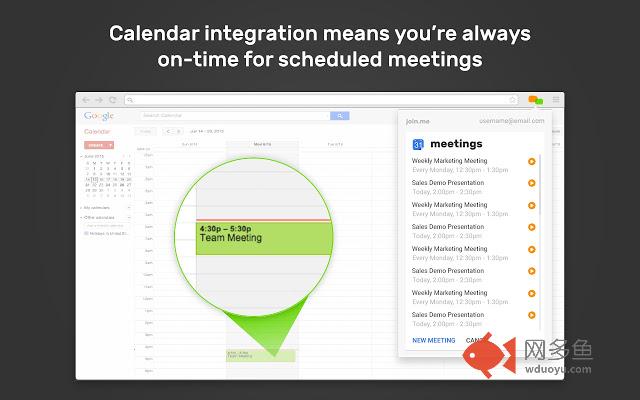
插件概述
Schedule join.me meetings in Google Calendar插件详情
Introducing Version 2.0 of join.me for Google Calendar!With this latest update, join.me users can:
- One-time authorize into their join.me accounts
- Schedule recurring meetings in Google Calendar (Pro/Business)
- Utilize multiple join.me accounts within the extension
- Schedule join.me meetings on alternate calendars (Pro/Business)
- Host and join meetings as a Free, Pro or Business user
Speed, security, and stability improvements have also been made, as well as upgrades to the extension’s look and feel.
Online meetings should be as simple and intuitive as possible.
Scheduling those meetings should be just as easy.
Built for today’s fast-paced, highly mobile workplace, join.me is the instant online meeting app that makes collaboration easier than ever. Powerful yet simple enough for anyone to use, join.me is ideal for ad-hoc meetings, scheduled meetings, formal presentations, face-to-face sessions, or anytime you need to share ideas and get work done fast.
join.me for Google Calendar 2.0
Scheduling an online join.me meeting is simple with Google Calendar. Meeting reservations are booked directly from your Google Calendar account - no additional booking software required.
To schedule a join.me meeting:
1. Start a Google Calendar invite as you normally would
2. Click "Make it a join.me meeting" below the location
3. Select your settings in the popup and click "Generate Invitation"
4. The join.me meeting information is automatically included in the Google Calendar description for attendees. Just click save and send the invite.
With join.me for Google Calendar users get:
- Online meetings for up to 250 participants
- Unlimited audio conferencing
- Unlimited screen sharing
- Presenter swap for all meeting attendees
And so much more - Get the join.me Google Calendar extension now!
Minimum Requirements:
- join.me Free, Trial, Pro, or Business
- Latest join.me desktop app for Windows or Mac
其他信息
官方唯一标识:nemahdoi****************lhlobdok
官方最后更新日期:2019年6月20日
分类:生产工具
大小:11.2MiB
版本:2.0.1252
语言:English (United States)
提供方:https://join.me
星级:4
插件下载
| 下载链接一 下载链接二 |
| Chrome插件离线安装教程 |
温馨提示
本站中的部份内容来源网络和网友发布,纯属个人收集并供大家交流学习参考之用,版权归版权原作者所有。
如果您发现网站上有侵犯您的知识产权的作品,请与我们取得联系,我们会及时修改或删除。
如果您觉得网多鱼对您有帮助,欢迎收藏我们 Ctrl+D。