Google Calendar Plus
插件截图
插件概述
Extra Options for Google Calendar插件详情
Be more productive with Google Calendar thanks to extra functionality provided by Google Calendar Plus.UPDATED: More events per day in the Month view! (Full Screen / Maximized not supported)
Please Note: To enable GCalPlus functions after installation, please check the boxes in the pop-out that opens when you click the GCal Plus Icon in the Chrome navigation bar, next to your User Icon top right. You will also need to reload the page for some settings to take effect, and "Authorize" for others.
What can GCalPlus do?
Alphabetical All Day Events: All day events used to be grouped by calendar, then were listed alphabetically regardless of which calendar they were in... and now they are grouped by calendar again. Use this option to list all day events alphabetically again.
Months Show Busy Dates: Authorise GCal Plus and enable "Months Show Busy Dates" to see at a glance on which days have events in your primary calendar. This works in all month previews, not only the year view!
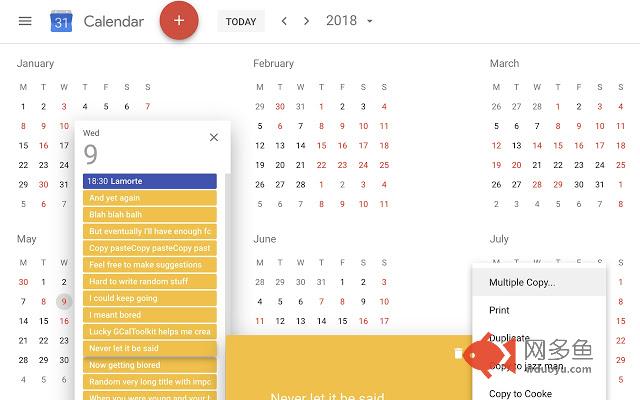
Multiple Copy: this is my favourite feature... first click "Authorize GCalPlus" in the plugin settings popout and authorize GCalPlus to access to your calendars. When authorised for Google Calendar, GCal Plus adds a new "Multiple Copy..." entry to the Options menu for every event (top right menu in the tile that opens when you click an event). You can copy/duplicate events to the same calendar directly from any view - month, day, week, 4 day, year or schedule; You can copy events to the same date (duplicate the event), copy to a new date, or copy to multiple dates. Please note: repeat series will not be copied entirely, only the selected occurrence of the event will be copied. Please note: your system must use the same TimeZone setting as the Google Calendar for which you are copying events for the best results.
More All Day Events: With this option you can display twice as many All Day events in the Weekly and Daily views.
Show Titles On Hover: When activated, this option will display a popup of the full event title when you hover over events.
Expand Overlapping Week Events: when you hover over timed events in the Week view this options expands the tiles to full width, and brings the event to the front for easier viewing.
Show More Events in Month View: with this option you'll get see at least twice as many events per day in the 'Month' view, and the entire page will scroll. For this reason, the option "Use L/R Arrows and Disable Month Scroll" MUST also be enabled. Note: macOS users will not be able to use Google Calendar in Full-Screen mode with this option because it requires a very small window resize to force a redraw of the events..
Use L/R Arrows and Disable Month Scroll: Why not use the usual left and right arrows instead of 'n' and 'p' for the next or previous day/week/month/year? With this setting Google Calendar Plus will also disable annoying month scrolling without affecting other places you actually need to scroll.
Large Dots, Small Weekday Numbers: This applies several custom styles to Google Calendar - compact day/week column headers and larger coloured bullets for timed events.
Colour Timed Events / Timed Bars: These options allow you to change the way timed events are displayed in the Month and Year views. "Colour Timed Events" will set the text title colour to that of the calendar. "Timed Bars" will display timed events in the same way as "All Day" events, except with the time of the event. You can choose between dark and light title text, independently of the main colour scheme you use. These settings are not always applied instantly.
Add "Create Event" to Year Previews. Click any day in the Year view to list the events on that day - with this option you'll also see a button labelled "Create Event" which allows you to immediately create a new event on that day.
Day Start/End: This option allows you to hide everything before and after specified times. This only applies when the calendar has scrollable content; otherwise more end of day hour slots will be shown to fill the space available.
GCal Plus is brought to you for free by GCalToolkit, Power Tools for Google Calendar (http://www.gcaltoolkit.com)
Please consider purchasing a subscription if you find this software useful!
其他信息
官方唯一标识:mjelhipe****************onihkakj
官方最后更新日期:2019年6月11日
分类:生产工具
大小:136KiB
版本:1.6.3
语言:English
提供方:https://www.gcaltoolkit.com
星级:3.9
插件下载
| 下载链接一 下载链接二 |
| Chrome插件离线安装教程 |
温馨提示
本站中的部份内容来源网络和网友发布,纯属个人收集并供大家交流学习参考之用,版权归版权原作者所有。
如果您发现网站上有侵犯您的知识产权的作品,请与我们取得联系,我们会及时修改或删除。
如果您觉得网多鱼对您有帮助,欢迎收藏我们 Ctrl+D。