捕捉GIF
插件截图
插件概述
Capture & edit screenshots, GIFs & videos of a selected area in Chrome.插件详情
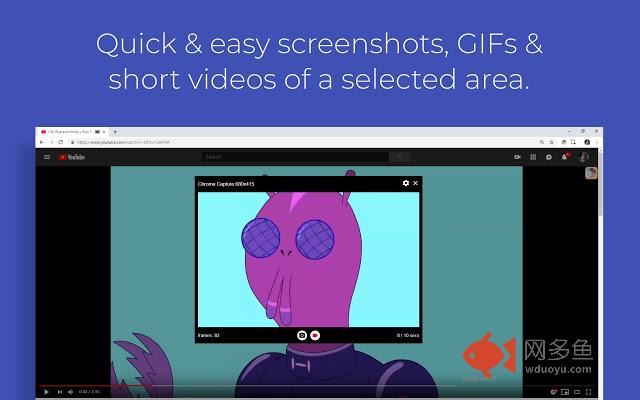
Chrome Capture is a simple, light weight capture tool for your browser. Capture a screenshot or record an animated GIF or video (WebM file) of your tab using a cropping tool.Try out the new drawing feature!
PLEASE NOTE: Chrome extensions do not work in the Chrome web store - this is quite likely the issue if Chrome Capture does not work for you. Also please read through this description before asking for support as your answer could be in here.
Chrome Capture 2.1.0 is here! I have addressed all the feedback and reviews and added premium settings to fund development for new features.
Shortcuts:
Alt + c: open Chrome Capture
Alt + s: take a screenshot of the selected area
Alt + r: start/stop recording
You may need to configure these in chrome://extensions/shortcuts
With Chrome Capture you have the power to output what you want. Select your snip-it and choose to output a recording as a GIF or video in the frame rate and quality you specify. Download or view? You decide!
General steps for use:
1. Start Chrome Capture by clicking the Chrome Capture icon.
2. Select a region of the screen using the crop tool.
3. Adjust settings to your preference by clicking the settings icon.
4. Click the camera icon to take a screenshot of the selected region or click the video icon to start recording the selected region (click again to stop recording).
5. Close the crop tool.
Common usages for this extension:
• Record snip-its of videos on YouTube and other sites into GIFs or WebMs to share.
• Capture screenshots quickly.
• Capture visual information which can't be demonstrated with a image.
• Record how to fill out a form.
If you experience performance issues please do one of the following:
• Decrease frame rate in settings
• Decrease quality in settings
• Make Chrome window smaller
I recommend outputting WebMs for long/big recordings as GIFS are not made for this purpose and the file size can become very large. Also please note that GIFs cannot contain sound and WebMs do not currently record sound either - if enough people ask for this feature I will look into implementing it but it is a lot of work.
If you experience any issues I am more than happy to help but please provide detailed reproduction steps and device information!
If you like this extension please show your support by sharing with friends, giving a rating or purchasing premium settings.
Change log:
1.4.1:
Critical bug fix for usage with Chrome 57.
2.0.0:
Completely rewritten and redesigned app.
2.1.0:
Bug fixes and UI updates.
2.1.1:
Snap to element on right click of overlay.
Allow users to capture closer to browser edges on top and bottom.
2.1.2:
Added German language support
Small improvements
2.1.3:
Implemented drawing when holding down the ctrl key - this needs to be enabled in settings
其他信息
官方唯一标识:ggaabchc****************fikjmphe
官方最后更新日期:2019年6月22日
分类:生产工具
大小:537KiB
版本:2.4.2
语言:支持4种语言
提供方:none
星级:3.4
插件下载
| 下载链接一 下载链接二 |
| Chrome插件离线安装教程 |
温馨提示
本站中的部份内容来源网络和网友发布,纯属个人收集并供大家交流学习参考之用,版权归版权原作者所有。
如果您发现网站上有侵犯您的知识产权的作品,请与我们取得联系,我们会及时修改或删除。
如果您觉得网多鱼对您有帮助,欢迎收藏我们 Ctrl+D。