Format Link
插件截图
插件概述
Format a link and copy it to the clipboard.插件详情
## Why do I need it?To format the link of the active tab instantly to use in Markdown, reST, HTML, Text, Textile or other formats.
## How to use
You can use keyboard shortcuts, context menus, or the toolbar button of Format Link extension
to copy a link in the specified format. Before doing that, you can optionally select some text
which may or may not contain a link.
### keyboard shortcut
The keyboard shortcut for "Copy a link in the default format" is shortcut for clicking the
toolbar button. The link is copied in the default format and the popup is shown under
the toolbar button.
Also there are shortcuts for copying in the link in the corresponding format regardless of
the default format.
You can change shortcuts at chrome://extensions/shortcuts
### context menu
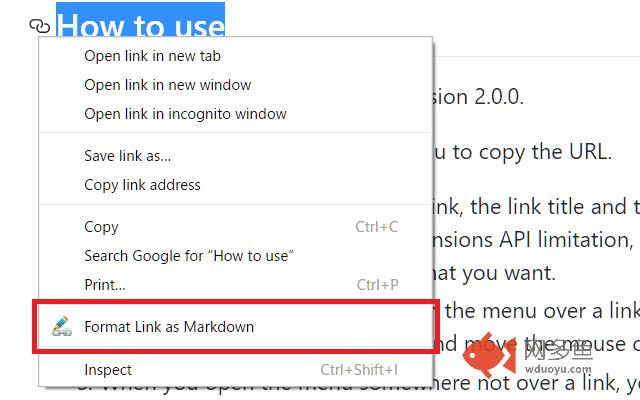
Open the context menu and select the "Format Link as XXX" menu item.
"XXX" in the menu item label changes as you change the default format by clicking the "Set as default" button in the popup page for the toolbar button.
If you check the "Create submenus" in the options page and save the options,
submenus for each format are created under the "Format Link" context menu group.
### toolbar button
When you press the toolbar button of "Format Link", the link is copied in the default format,
the popup page becomes open, and the formatted text is shown in the text area.
If you want to copy the link in different format, you can press one of the radio buttons.
Also if you want to change the default format, you can press the "Set as default" button.
## Flexible settings
You can modify formats in [Tools] -> [Extensions] -> Clik "Options" link in "Format Link" Extension.
In format settings, you can use the mini template language.
* {{variable}}
* variable = title / url / text
* The value of variable `title` is the HTML page title.
* The value of variable `text` is the selected text if some text is selected,
the link text if you open the context menu over a link (see KNOWN LIMITATION below for link text),
or the page URL if no text is selected and you open the context menu not over a link.
* The value of the variable `url` is the link if you open the context menu over a link,
the first link if selection contains a link, or the HTML page URL otherwise.
* No spaces are allowed between variable name and braces.
* {{variable.s("foo","bar")}}
* Which means `variable.replace(new RegExp("foo", 'g'), "bar")`
* You can use escape character \ in strings.
* You must escape the first argument for string and regexp.
For example, `.s("\\[","\\[")` means replacing `\[` with `\\[`
* You can chain multiple .s("foo","bar")
* You can use the escape character \ in strings. For example, you need to escape `\` with `\` like `\\`,
and also you need to escape `{` with `\` like `\{`. See the LaTeX example below.
* Other characters are treated as literal strings.
Here are examples:
* Markdown
```
[{{text.s("\\[","\\[").s("\\]","\\]")}}]({{url.s("\\)","%29")}})
```
* reST
```
{{text}} <{{url}}>`_
```
* HTML
```
{{text.s("<","<")}}
```
* Text
```
{{text}}\n{{url}}
```
* Redmine Texitile
```
"{{title.s("\"",""").s("\\[","[")}}":{{url}}
```
* LaTeX
```
\\href\{{{url}}\}\{{{text}}\}
```
## License
MIT License.
Source codes are hosted at [Github](https://github.com/hnakamur/FormatLink-Chrome)
## KNOWN LIMITATIONS
* Due to security reason, you cannot copy the URL on some pages like the Chrome Extension Gallary.
* When you copy a link with a context menu after pointing mouse to a link, this extension manually searches the first link whose URL is equals to the link you pointed in the whole document, due to limitation of [chrome.contextMenus API](https://developer.chrome.com/extensions/contextMenus). So if there are multiple links of the same URL, and if you pointed to non-first link, the text is not what you want. However this is the best we can do right now.
* Chrome allow each extension to have at most 4 keyboard shortcuts. One shortcut is used for copying a link with the default format, and the rest of three are used for copying a link with the corresponding format 1 to format 3. So format 4 to format 9 does not have keyboard shortcut.
其他信息
官方唯一标识:pocemhmk****************lcjcbjgg
官方最后更新日期:2019年3月24日
分类:生产工具
大小:55.35KiB
版本:3.0.0
语言:English
提供方:none
星级:4.7
插件下载
| 下载链接一 下载链接二 |
| Chrome插件离线安装教程 |
温馨提示
本站中的部份内容来源网络和网友发布,纯属个人收集并供大家交流学习参考之用,版权归版权原作者所有。
如果您发现网站上有侵犯您的知识产权的作品,请与我们取得联系,我们会及时修改或删除。
如果您觉得网多鱼对您有帮助,欢迎收藏我们 Ctrl+D。