Ensemble Video Recorder
插件截图
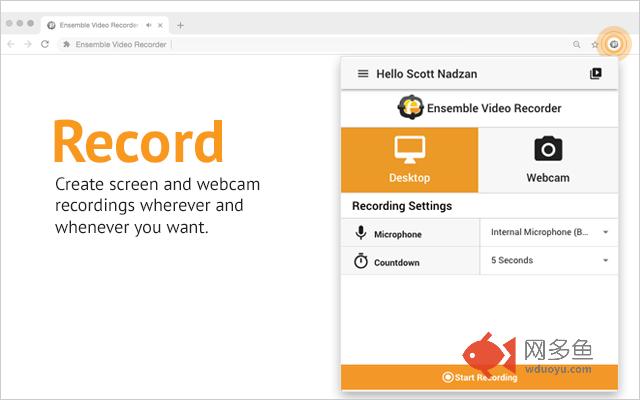
插件概述
The Ensemble Video Recorder (beta) allows you create screen and webcam recordings, then upload and share using Ensemble Video.插件详情
Easily create screen and webcam recordings on any computer with the Chrome browser. Then upload and instantly share your video using the Ensemble Video Platform. Ensemble Video is a turnkey video platform that streamlines video capture, video management and video publishing. Ensemble Video enables hundreds of progressive organizations across the globe to deliver accessible media content any time, over a variety of networks.RECORD
Desktop, browser tab or webcam recording
UPLOAD
Upload directly into your Ensemble Video media library
SHARE
Once uploaded to Ensemble Video you can publish to any website, LMS, CMS or blog
-------------------------------------------
Why do people use Ensemble Video Recorder?
Education
• Simple screen capture for educators
• Perfect for flipped classrooms
• Designed for Chromebooks
Technology Support
• Capture detailed on-screen experiences
• No more repetitive explanatory emails
• Find and demonstrate bugs with videos
Corporate Training
• Speed up communication and save money
• Create training videos and demos for workforce
• No more repetitive employee on-boarding
-------------------------------------------
Specs
• Requires Ensemble Video 5.1 and above
• Videos can be saved to your local disk and/or directly uploaded to Ensemble Video
• Ensemble Video Recorder does not depend on any external software (like Java, Flash or other plugins) so it runs on Chrome OS and Chromebooks
• Screen recording is a CPU intensive task. Older or weaker computers may lag if multiple programs and tabs are open at the same time as a screencast
其他信息
官方唯一标识:ikddmmdj****************kkklckml
官方最后更新日期:2019年2月4日
分类:生产工具
大小:28.8MiB
版本:0.9.4
语言:English
提供方:www.ensemblevideo.com
星级:3
插件下载
| 下载链接一 下载链接二 |
| Chrome插件离线安装教程 |
温馨提示
本站中的部份内容来源网络和网友发布,纯属个人收集并供大家交流学习参考之用,版权归版权原作者所有。
如果您发现网站上有侵犯您的知识产权的作品,请与我们取得联系,我们会及时修改或删除。
如果您觉得网多鱼对您有帮助,欢迎收藏我们 Ctrl+D。