DeepSearch
插件截图
插件概述
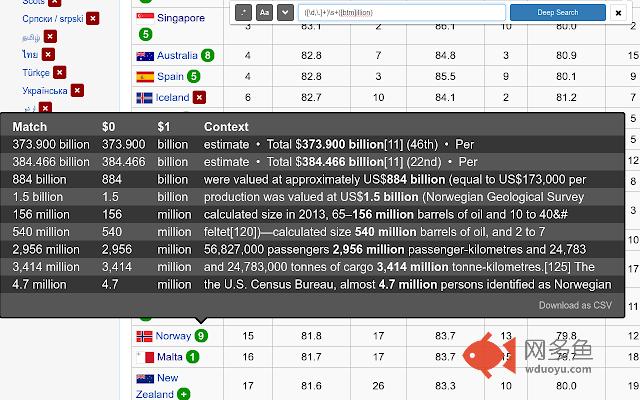
Supercharge your browsers find with regex and deep search插件详情
DeepSearch is a Chrome Extension that supercharges `Ctrl+F`, letting you search for text on all *linked* pages simultaneously. You can review your matches in tooltips next to the links or download them in a CSV file for future analysis.Advanced users can use Regular Expressions (regex) complete with capture groups to extract exactly the information they are looking for. This works both on the current page and as part of a "deep" search.
Tips
* Open the DeepSearch interface with "Alt+Shift+F" or click the `.*` icon in your Chrome toolbar.
* You can cycle through "shallow" results with the "Find" and "Find Prev" buttons or by hitting "Enter" and "Shift+Enter" respectively.
* Performing "deep" search (with the chevron selected) can take several seconds as it downloads all of the linked pages. This delay is a function of your internet connection and the number of links present. You can cancel your search at any time by clicking the `X` button.
* You may download results as a CSV from a tooltip (for "deep" searches) or the DeepSearch menu (for "shallow" searches). This file can be opened with any spreadsheet tool (e.g., Excel).
其他信息
官方唯一标识:jlkomfek****************hpoaegpc
官方最后更新日期:2017年5月9日
分类:生产工具
大小:259KiB
版本:0.1.2
语言:English
提供方:none
星级:4.8
插件下载
| 下载链接一 下载链接二 |
| Chrome插件离线安装教程 |
温馨提示
本站中的部份内容来源网络和网友发布,纯属个人收集并供大家交流学习参考之用,版权归版权原作者所有。
如果您发现网站上有侵犯您的知识产权的作品,请与我们取得联系,我们会及时修改或删除。
如果您觉得网多鱼对您有帮助,欢迎收藏我们 Ctrl+D。