Dawdle block
插件截图
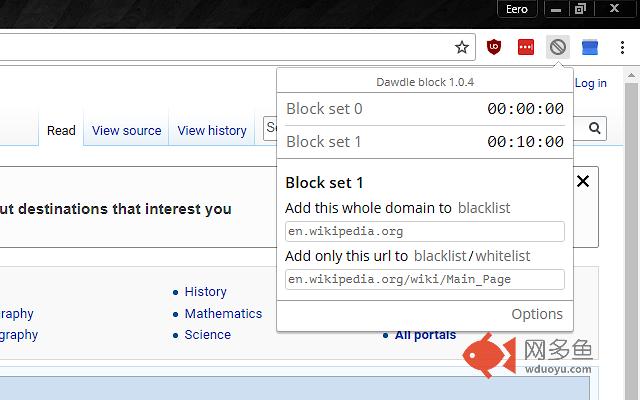
插件概述
Put time limits on unproductive sites.插件详情
Dawdle block limits the usage of time-wasting sites by blocking them after the time limit you set is exceeded.Avoid procrastination.
You can set a daily time limit, active hours and active days. You can specify urls or parts of them to match visited sites. If a match is found your time limit begins to deplete. When the time is used up, the blacklisted sites are blocked. You can also whitelist sites to not deplete the time. For example you can block the whole domain reddit.com, but allow www.reddit.com/r/programming/.
You can whitelist or blacklist specific YouTube channels or genres.
You can set different rules for different times of the day, different days of the week or anything you can come up with using multiple independent block sets. You can have up to 50 of them.
Version 1.1.6
- Fixed a bug where users could not add YouTube channels from the options page
Version 1.1.3
- Fixed a bug where timer would reset every time when opening the browser
Version 1.1.2
- Popup buttons are now not disabled when annoy mode is on (same behaviour as options page)
Version 1.1.1
- Annoy mode banner font more reliably pretty
- Firefox specific css optimization
Version 1.1.0
- Annoy mode
* shows overtime in a banner instead of blocking
* less intrusive way to discourage website usage
- Dark theme
- Slight visual update
- Small stuff
* periodic saving made more bandwith efficient
* corrected typos
* fixed issue, where in rare cases time elapsed at double rate
其他信息
官方唯一标识:eabokghk****************edldgfhb
官方最后更新日期:2019年6月3日
分类:生产工具
大小:116KiB
版本:1.1.6
语言:English
提供方:https://eerolehtinen.net
星级:5
插件下载
| 下载链接一 下载链接二 |
| Chrome插件离线安装教程 |
温馨提示
本站中的部份内容来源网络和网友发布,纯属个人收集并供大家交流学习参考之用,版权归版权原作者所有。
如果您发现网站上有侵犯您的知识产权的作品,请与我们取得联系,我们会及时修改或删除。
如果您觉得网多鱼对您有帮助,欢迎收藏我们 Ctrl+D。