Alice Keeler Drive20
插件截图
插件概述
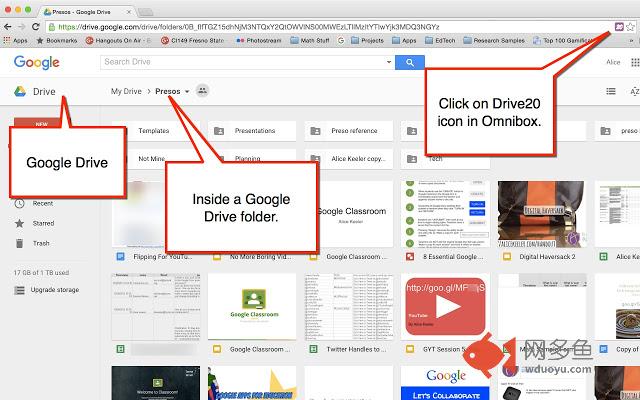
This Chrome extension works when you are in a folder in Google Drive to open up the first 20 files in the folder.插件详情
This Chrome extension works when you are in a folder in Google Drive to open up the first 20 files in the folder. For teachers, this allows reviewing student work and providing feedback quickly. Click on the Drive20 icon in the omnibox while in Google Drive to open files. Right click on the extension icon to change the default from 20 files to a specified amount. You can quickly close files by right clicking on a Chrome tab and choosing "Close Tabs to the Right."Workflow tip: create subfolders to divide files into chunks. Open all files within a subfolder quickly using the Drive20 Chrome extension. Go to the last tab. Insert comments on the document. Use Control W to close the document and view the next document.
其他信息
官方唯一标识:ccpkbmhn****************kbadhgbp
官方最后更新日期:2019年7月3日
分类:生产工具
大小:124KiB
版本:1.1.0
语言:English
提供方:none
星级:3.2
插件下载
| 下载链接一 下载链接二 |
| Chrome插件离线安装教程 |
温馨提示
本站中的部份内容来源网络和网友发布,纯属个人收集并供大家交流学习参考之用,版权归版权原作者所有。
如果您发现网站上有侵犯您的知识产权的作品,请与我们取得联系,我们会及时修改或删除。
如果您觉得网多鱼对您有帮助,欢迎收藏我们 Ctrl+D。