smarterPod: Simple and Smart Podcast Player
插件截图
插件概述
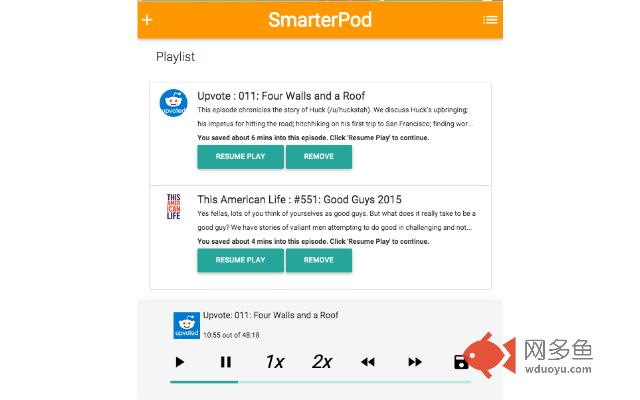
Listen to podcasts in the background of Chrome! Sync content across computers, manage your feeds, save progress, get new episodes!插件详情
BETA VERSION FOR COURAGEOUS TESTERS!--
New in version 0.3, you can search on Apple's iTunes Podcast database for your favorite podcasts!
smarterPod is a Angular.js based Google Chrome extension for listening to podcasts in the background of your browser, with feed management capabilities, Chrome notifications on title change, metadata retrieval as well as Google Storage Sync capability for your partially listened episodes and current playlists, regardless of which computer you're on. smarterPod aims to be the most straightforward way to listen to podcasts in your browser without the need for extra tabs, heavy Flash player clients or external application.
smarterPod updates your feeds and syncs every 15 minutes, ensuring that you have the most updated content and saved episodes on every computer you use at all times.
Right now, smarterPod is in Beta, with some awesome new features planned in the pipeline, including custom feed retrieval (download X episodes of this feed on every update). If there is something you would like to see, let us know! This is the first public version of this project and I hope to add new features, improve the application and work with it more over the coming months!
Also, there is currently a list of bugs on GitHub: https://github.com/smromain/smarterPod. If you encounter any bugs, please feel free to either submit on Github, through Chrome Web Store's User Feedback feature or via email (using my email address in the app). Thanks!
--
ON PERMISSIONS: Google says that the application requires 'permission to read data from all sites you visit'. This is not correct: smarterPod now requires permission to send requests for podcast feed data and receive data from those servers with podcast information.
ON SYNC: Google Sync MUST be enabled for smarterPod to work. This is a pretty easy process, and you can learn more about it here: https://support.google.com/chrome/answer/165139.
其他信息
官方唯一标识:ehlmnfeo****************ggkojchf
官方最后更新日期:2017年11月28日
分类:新闻与天气
大小:11.02MiB
版本:0.3.0.2
语言:English (United States)
提供方:none
星级:3.1
插件下载
| 下载链接一 下载链接二 |
| Chrome插件离线安装教程 |
温馨提示
本站中的部份内容来源网络和网友发布,纯属个人收集并供大家交流学习参考之用,版权归版权原作者所有。
如果您发现网站上有侵犯您的知识产权的作品,请与我们取得联系,我们会及时修改或删除。
如果您觉得网多鱼对您有帮助,欢迎收藏我们 Ctrl+D。