vGet Extension (Video Downloader, DLNA)
插件截图
插件概述
下载视频嵌入网站或它们蒙上你的智能电视。插件详情
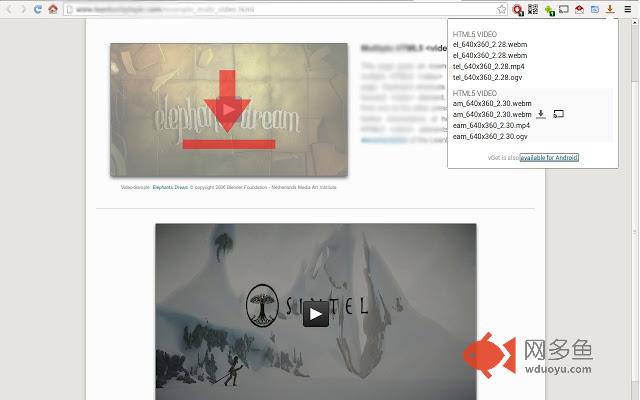
vGet detects videos embedded in websites and allows to download them or play them via DLNA directly on a Smart TV.The extension is designed to be minimal-invasive. It is only loaded only on demand, when the vGet button is clicked. So it has no performance impact nor does it use any memory while not used. Other similar extensions out there basically sniff all network traffic regardless if used or not. This unnecessarily drains performance. (Use chrome://inspect/#extensions -> Extensions to verify. There should not be any entry while not used).
Play Videos directly on your Smart TV
vGet supports DLNA/UPnP to play (cast) videos directly on a DLNA-Device in your local network. Many devices out there support DLNA, for example Smart TVs, XBox, MediaCenters, AllShare Devices etc. vGet does not relay the video stream but streams directly from the internet. This saves battery life - the video even keeps playing when you switch off your Chromebook completely. So vGet offers Chromecast-like functionality without requiring additional hardware.
This requires vGet Cast (https://chrome.google.com/webstore/detail/vget-cast-dlna-controller/ekdjofnchpbfmnfbedalmbdlhbabiapi
) to ve installed
Support for Chromecast will be added soon
Limitations
- Youtube is not supported due to terms of service restrictions.
- No support for streaming formats (rtsp, HLS).
- Flash videos are not detected on all websites
If you experience any problems or have suggestions for improvements, please report them to vget@w69b.com
其他信息
官方唯一标识:hniladke****************jaogciic
官方最后更新日期:2016年6月22日
分类:娱乐
大小:251KiB
版本:0.1.11
语言:支持40种语言
提供方:none
星级:3.8
插件下载
| 下载链接一 下载链接二 |
| Chrome插件离线安装教程 |
温馨提示
本站中的部份内容来源网络和网友发布,纯属个人收集并供大家交流学习参考之用,版权归版权原作者所有。
如果您发现网站上有侵犯您的知识产权的作品,请与我们取得联系,我们会及时修改或删除。
如果您觉得网多鱼对您有帮助,欢迎收藏我们 Ctrl+D。