Smart LG TV remote control
插件截图
插件概述
Remote control for LG smart TV set.Extension allows to control some WebOS based LG TV models. It uses generic protocol, so can be…
插件详情
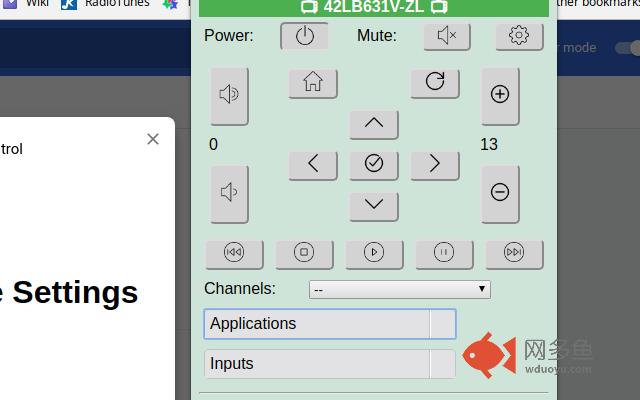
Remote control for LG smart TV set.Extension allows to control some WebOS based LG TV models. It uses generic protocol, so can be used with vary of models.
Current version supports: volume change, mute on/off, channels up/down and channels from list selection, TV set poweroff, input selection. User also can run installed on TV apps.
By clicking right mouse key on any link on any page "Open link on LG TV" menu option can be used. User can open that link directly on TV browser.
TV can be controlled using keyboard when extension popup or magic control page are open. Arrow keys (cursor keys), volume (gray "+"/"-"), home (Home), back (alt + left arrow), OK (Enter).
User can do search by channel name as well as mark channel as favorite to have it on the top of channels list.
Experimental "magic control" mode now is available (see pop up button with mouse icon). This feature emulates "magic remote" functions using PC's mouse.
In magic remote mode, user may enter text from PC keyboard if TV system keyboard enabled and input text box got a focus.
To use this extension, TV should be connected to network and "LG connected apps" settings should be enabled.
User shall put TV IP address into extension settings.
Changelog:
1.39..1.40 bugfixes
1.38 generated background page now not persistent.
1.37 bugfixes
1.35..1.36, localization support, google analytics.
1.34 channel favorites added
1.33 code cleanup, google analytics script added
1.32 channels search added
1.31 materialize design introduced
1.30 bugfixes, magic control improvements, power icon added
1.28..1.29 magic remote control feature improvements
1.27 UI adjustments.
1.26 experimental "mouse capture" and keyboard feature added. See option page.
1.25 open link on TV bug fix
1.23..1.24 options page beautified
1.22 background color settings added
1.21 font size settings added
1.14..1.20 bugfixes
1.12..1.13
- buttons text replaced with images
1.11
- extra "tabs" permission removed
1.10
- When popup open, TV can be controlled using keyboard. Arrow keys (cursor keys), volume (gray "+"/"-"), home (Home), back (alt + left arrow), OK (Enter)
1.6..1.9
- "Open link on LG TV" feature added. Using right-click context menu user can open any link directly on TV in one click.
- experimental "mouse capture" mode added for magic control emulation. See option page.
1.5
- home/back, navigation buttons added
- small UI improvements.
1.4
- UI improvements and bugfixes
- play/pause/stop/rewind/forward buttons added
- 3D switch added
- current program information now shown
- TV model shown in header instead of IP.
1.2
- application list/runner added
- channel list/runner added
- internal code cleanup
1.1 input list selector added
1.0 initial version
其他信息
官方唯一标识:hbibebch****************pikanpll
官方最后更新日期:2019年7月9日
分类:娱乐
大小:391KiB
版本:1.40
语言:支持3种语言
提供方:none
星级:4.2
插件下载
| 下载链接一 下载链接二 |
| Chrome插件离线安装教程 |
温馨提示
本站中的部份内容来源网络和网友发布,纯属个人收集并供大家交流学习参考之用,版权归版权原作者所有。
如果您发现网站上有侵犯您的知识产权的作品,请与我们取得联系,我们会及时修改或删除。
如果您觉得网多鱼对您有帮助,欢迎收藏我们 Ctrl+D。