SimpleChessBoard
插件截图
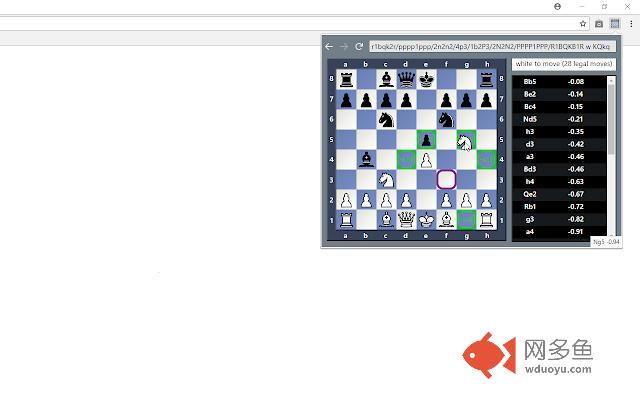
插件概述
Simple chess FEN/PGN viewer with evaluation插件详情
SimpleChessBoard is simple chess position and game analysis tool available as browser extension and as a web page at https://hxim.github.io/simplechessboard/popup/simplechessboard.html.Features:
* Load your chess position or game using FEN or PGN.
* Setup pieces manually with your mouse in edit mode.
* You can browse game history and try out different variations. Arrow is showing last move and move recomennded by engine.
* List all legal moves and show them on chessboard
* Checkmate or stalemate is detected
* Analyze position and all legal moves with javascript version of Stockfish from https://github.com/niklasf/stockfish.js
* Show evaluation graph and visalize mistakes or blunders with different colors
* Open position or game in new window via URL. You can also share this URL with friends (in online version) and your position or entire game will be encoded in the link.
* You can also play chess against computer
Copy your FEN or PGN to clipboard and paste it in the input box at the top. You can also manually
edit and change FEN displayed there. This tool also supports entering games as list of moves in
simplified format like this: "1. e4 e5 2. Nf3 Nf6 3. d4". You have several options to make legal moves on board -
Click on move in list of all legal moves in the right or move piece with mouse using drag and drop or select piece and then
click on destination square. This is useful on touchscreen.
Note: To add, remove pieces or make illegal moves you need to use edit mode (see below).
Buttons and main menu:
* Go back to previous position
* Go forward to next position
* Refresh engine evaluation for current position
* Revert changes to loaded or saved game (go back to original game after trying some variation)
* Keep changes so that next revert changes return to current state (also available with CTRL+Click on Revert)
* Open in new window where current game or position is encoded as part of URL (useful to save game for later or share with someone)
* Edit mode where you can setup position (add, remove pieces, illegal moves)
* Information about played moves
* Open main menu
* Start game against computer (use CTRL to play as black)
* Flip board (in main menu and also available as button in bottom right corner of chessboard)
* Change side to move (in main menu and also available as button in top right corner of chessboard)
其他信息
官方唯一标识:hppnfmea****************edncdokl
官方最后更新日期:2018年9月1日
分类:娱乐
大小:627KiB
版本:1.6
语言:English
提供方:none
星级:4.3
插件下载
| 下载链接一 下载链接二 |
| Chrome插件离线安装教程 |
温馨提示
本站中的部份内容来源网络和网友发布,纯属个人收集并供大家交流学习参考之用,版权归版权原作者所有。
如果您发现网站上有侵犯您的知识产权的作品,请与我们取得联系,我们会及时修改或删除。
如果您觉得网多鱼对您有帮助,欢迎收藏我们 Ctrl+D。