Scratcher's AtCoder
插件截图
插件概述
for Scratchers who want to compete in AtCoder插件详情
With this extension, you can compete in AtCoder with Scratch 3.0!(この拡張機能を使うと,Scratch 3.0 で AtCoder に参加できるようになります!)
******** Usage(使い方)********
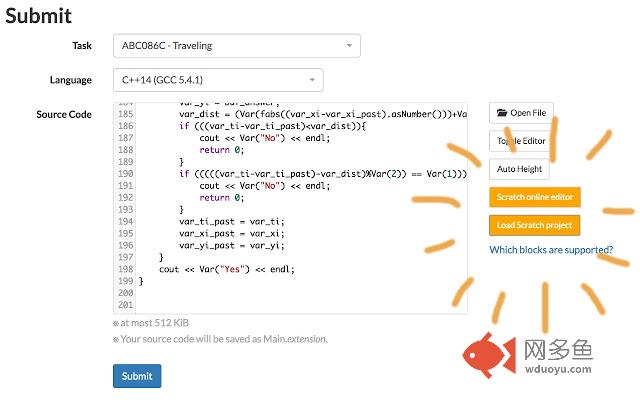
(1) Go to a submission form of AtCoder, and click orange "Scratch 3.0 online editor" button to open the online editor.
(AtCoder の解答フォームの横にある,オレンジ色の「Scratch 3.0 オンラインエディタ」ボタンをクリックして,オンラインエディタを開きます.)
(2) Create your solution in Scratch online editor. If your solution is ready, download your Scratch project to a local file. ([File] -> [Save to your computer])
(Scratch オンラインエディタ上で,解答コードを作成します.完成したら,Scratch プロジェクトをローカルファイルにダウンロードします(画面左上のメニューから「ファイル」→「コンピューターに保存する」).)
(3) Return to AtCoder and click the orange "Load Scratch project" button. Then select your Scratch project file you downloaded in (2).
(AtCoder に戻り,オレンジ色の「Scratch 3.0 プロジェクトをロード」ボタンをクリックして,(2)でダウンロードしたプロジェクトファイルを選択します.)
(4) Your Scratch project file will be instantly converted to C++ source, and displayed in the solution form.
(Scratch プロジェクトが瞬時に C++ ソースに変換され,解答フォームに表示されます.)
(5) Submit it! (Make sure that "C++14(GCC 5.4.1)" (or newer) is selected as the language.)
(そのまま解答を提出しましょう!(言語は "C++14(GCC5.4.1)"(またはそれより新しいバージョン)を選択してください))
******** Examples of solutions(Scratch での解答例)********
https://scratch.mit.edu/studios/5346476/
******** Developer's page (開発者のページ)********
https://github.com/yos1up/scratch2cpp/tree/master/web/crx
Twitter: @yos1up
其他信息
官方唯一标识:hackndbj****************hnfddklh
官方最后更新日期:2019年3月27日
分类:娱乐
大小:2.2MiB
版本:1.2.0
语言:English
提供方:none
星级:4
插件下载
| 下载链接一 下载链接二 |
| Chrome插件离线安装教程 |
温馨提示
本站中的部份内容来源网络和网友发布,纯属个人收集并供大家交流学习参考之用,版权归版权原作者所有。
如果您发现网站上有侵犯您的知识产权的作品,请与我们取得联系,我们会及时修改或删除。
如果您觉得网多鱼对您有帮助,欢迎收藏我们 Ctrl+D。