QuickShow for YouTube™
插件截图
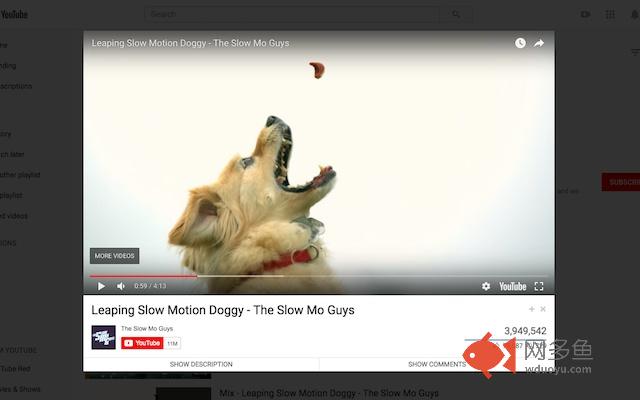
插件概述
Watch videos in a popup. Auto HD, Resizable, Autoplay, Autoloop, No Ads, Movie Mode, Auto-pause/resume, and more!插件详情
How to use========
- Click on video thumbnails to watch in popup
- Click on video links to watch normally (without popup)
Features
=======
- Automatically start playing (can be turned off)
- Automatically play in HD (or any other playback quality)
- Automatically turn on/off annotations
- Automatically loop videos and playlists (can be turned off)
- Resizable -- view in any size you want!
- Faster video loading (no more pesky comments!)
- Automatically pause when popup is closed
- Automatically resume when reopening -- pick up right where you left off
- Filters out video ads
- Dark mode for ultimate theater experience
Description
========
Quick Show allows you to view videos in resizable popups, which can be customized to autoplay videos at any resolution. Simply click on any video thumbnail and the popup will automatically show and start playing the video with all the comments and ads filtered out. Click outside the popup and the popup will close, automatically pausing the video. Feel like viewing the video normally? Just click on video titles instead of thumbnails, and everything will work as though the extension weren't there.
Why?
====
YouTube Quick Show streamlines the YouTube experience by allowing users to watch videos without ever having to leave the page. When going through the list of videos in a channel, search results page, etc., you no longer have to click into a video, and then press the browser back button to return to the list to view the next video. We believe this greatly reduces the hassle involved with browsing YouTube in general. Moreover, it speeds up the video load since things like ads and comments are filtered out.
How?
====
Quick Show provides a popup that embeds a single video within. It mimics the standard YouTube page by providing the channel information, subscribe button, view count, and likes/dislikes for the video being displayed. The embedded video is slightly larger than the default YouTube video, is completely resizable, and works in full-screen. When the video popup is displayed, the background is slightly darkened to remove background distractions and provide a movie-like viewing experience.
Permissions
=========
We do NOT track any user or usage data, nor will we ever phish information or scam money. The requested permissions for the extension are required only to get information like video view count and likes/dislikes counts. You can verify this by reviewing the source code directly.
Change log
=========
Update v1.4+:
- Video no longer plays in background when popup is closed.
Update v1.5:
- Clicking on "watch later" button should not trigger the popup.
Update v1.6:
- Popup works for "Load More" videos.
Update v1.7:
- Fix the view count display.
Update v1.8:
- FIx popup for video recommendations.
Update v1.9:
- Added options page. Now you can specify whether you want to automatically start playing the video, what quality to play the video at, and whether you want to turn annotations on.
Update v2.0:
- FIx annotations bug, fix modal bug when not logged into YouTube.
Update v2.1:
- Fix options page not showing 'saved' message.
Update v2.2:
- Added resizable player feature. Made background darker for a better viewing experience. Fixed temporary bug with "watch later" icons.
Update v2.3:
- Added ability to view full playlists in the popup. Video information updates as the next video loads. Fixed popup for thumbnails under "Popular Uploads" in some channels.
Update v2.4:
- Fix minor bug with video being un-clickable after clicking on resize handle.
Update v2.5:
- Added popup repositioning for window resize. Minor fixes and improvements.
Update v2.6:
- Major fixes for new YouTube UI. Added autoloop, autopause (for non-popup videos), video description, and loading indicator. Moved window resizing to bottom right of modal. Made options a bit more user-friendly.
Update v2.7:
- Added support for ratings and updated look and feel of popup.
Update v3.0:
- Added dark mode, support for adding videos to playlists, comments "digest" (top 20), and options menu accessible from the icon next to the search bar. Also, clicking on suggested videos can optionally be loaded in the popup directly, instead of as a separate page. Added video publish date to description.
其他信息
官方唯一标识:hceoeoih****************nefopkkp
官方最后更新日期:2019年3月8日
分类:娱乐
大小:164KiB
版本:3.0.2
语言:English (United States)
提供方:none
星级:4.1
插件下载
| 下载链接一 下载链接二 |
| Chrome插件离线安装教程 |
温馨提示
本站中的部份内容来源网络和网友发布,纯属个人收集并供大家交流学习参考之用,版权归版权原作者所有。
如果您发现网站上有侵犯您的知识产权的作品,请与我们取得联系,我们会及时修改或删除。
如果您觉得网多鱼对您有帮助,欢迎收藏我们 Ctrl+D。