Media Player
插件截图
插件概述
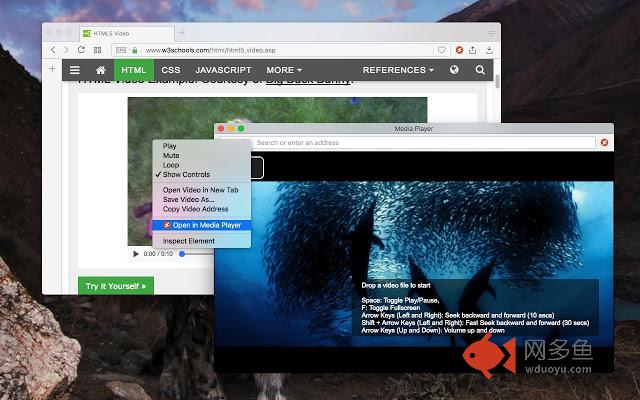
A simple yet powerful media player built on top of video.js project插件详情
"Media Player" is a browser extension to play music and video files either locally or from an online source. This project aims to bring VLC like media player using HTML5 technology. The add-on is built on top of the well-known video.js project by applying a few custom plug-ins to enhance the user experience.You can start watching an offline video file by drag and drop the video file into the player or by pressing the big play button. To have the player load subtitle as well, make sure to drop both video and subtitle files together (The dropped subtitle should have the same name as the file and needs to be in SRT or VTT format).
You can use your keyboard to control the following playback options:
1. "F" key: This will toggle the fullscreen mode on and off
2. "Space" key: This will toggle the playing state of the player
3. "Key Up" and "key Down": These keys can be used to increase or decrease volume.
4. "Key Left" and "Key Right": These keys can be used to seek backward and forward for 10 seconds.
Mouse wheel can also be used to increase or decrease the volume.
Change Log:
0.1.2:
1. Media Player now supports history (it will save the current track position and retrieves it after a restart)
2. Media player now supports global keyboard shortcuts for toggle pause and play state, move to the previous track and move to the next track
0.1.3:
1. Better playlist!
0.1.4:
1. For audio tracks, a seek-able wave-surfer is replaced the old poster image
2. playback rate is now adjustable.
其他信息
官方唯一标识:mgmhnaap****************hpcpecpj
官方最后更新日期:2017年11月6日
分类:娱乐
大小:476KiB
版本:0.1.4
语言:English
提供方:none
星级:3.9
插件下载
| 下载链接一 下载链接二 |
| Chrome插件离线安装教程 |
温馨提示
本站中的部份内容来源网络和网友发布,纯属个人收集并供大家交流学习参考之用,版权归版权原作者所有。
如果您发现网站上有侵犯您的知识产权的作品,请与我们取得联系,我们会及时修改或删除。
如果您觉得网多鱼对您有帮助,欢迎收藏我们 Ctrl+D。