Better Netflix
插件截图
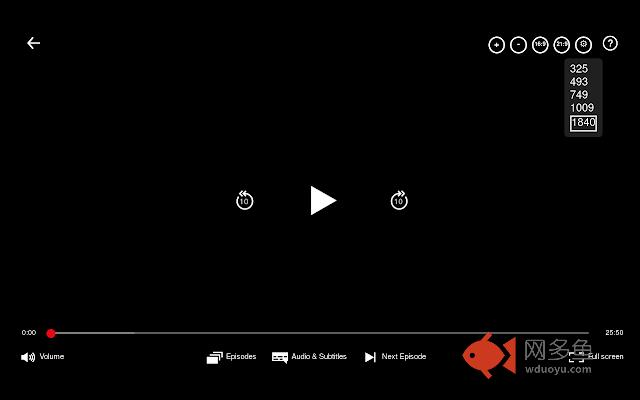
插件概述
Adds various features to Netflix like support for ultrawide displays (21:9 aspect ratio).插件详情
"Better Netflix" adds the following features to Netflix:- Ultrawide display support (21:9 aspect ratio) [To 21:9: '.', to 16:9: ',']
- Zoom in and out of the video [Zoom in: '+', zoom out: '-']
- Show the elapsed time of the video
- Disable mouse movement [Disable: 'd', enable: 'e' or 'Esc']
- Statistics [Toggle: 'q']
- Menu to select video bitrate (video quality)
- Option to automatically select the highest video bitrate available. This option is enabled by default. It can be disabled on the options page (More Tools -> Extensions -> Better Netflix -> Details -> Extension options. Or: Better Netflix Icon -> Options).
"Better Netflix" provides the keyboard shortcuts specified in [ ]-brackets of the list above.
Some users are using another Netflix player than I am (which is shown on the screenshot). If the buttons of Better Netflix are on the bottom of the player, you are not able to use the bitrate menu because it opens to the bottom. Because of that an option is available to open the menu to the top. On the Add-ons page of Firefox you can click Preferences next to Better Netflix. You can check the checkbox next to the option "Open the quality menu to the top" and click on the Save button. If you go to the Netflix page afterwards (or reload the page if you already opened it), the menu will open to the top.
Source code: https://gitlab.com/konstantin-mueller/better-netflix
其他信息
官方唯一标识:lgaajejc****************lffiigah
官方最后更新日期:2019年6月2日
分类:娱乐
大小:544KiB
版本:1.4.6.2
语言:English
提供方:none
星级:4.4
插件下载
| 下载链接一 下载链接二 |
| Chrome插件离线安装教程 |
温馨提示
本站中的部份内容来源网络和网友发布,纯属个人收集并供大家交流学习参考之用,版权归版权原作者所有。
如果您发现网站上有侵犯您的知识产权的作品,请与我们取得联系,我们会及时修改或删除。
如果您觉得网多鱼对您有帮助,欢迎收藏我们 Ctrl+D。