Alternate Player for Twitch.tv
插件截图
插件概述
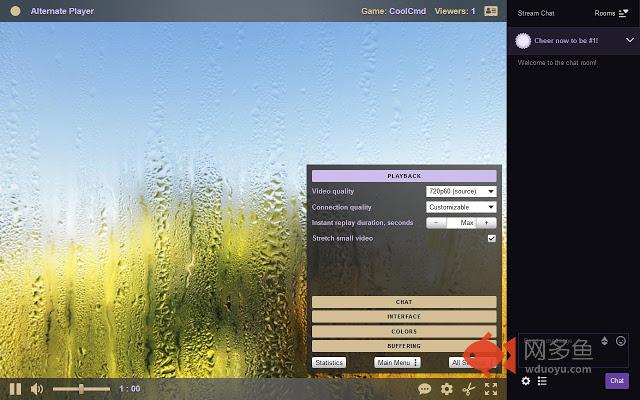
Alternate player of live broadcasts for Twitch.tv website.插件详情
Advantages of the extension's player:• Less stops during playback: if necessary, the player's settings can be tuned to your Internet connection.
• Instant replay of the last minutes of the live broadcast, optionally with increased/reduced speed or frame-by-frame.
• Does not insert ads. Ads that Twitch embeds directly into the stream, in some cases can be shown.
• “Audio only” mode. Ideal for music listening.
• Allows you to select the device for audio output (if more than one device is available): speakers, headphones, TV, etc.
• You can set the size and location of the chat, even while in full-screen mode.
• In chat (for example, attached to the bottom or top side of the window) there is room for much more messages and emotes (see screenshots).
• You can completely disable the chat: it will not consume computer resources, and you will not be in the viewers list.
• Changes volume by mouse wheel.
• You can colorize the player interface to your liking.
• Takes up less RAM.
• Rapid start-up of the player. This is especially noticeable on slower computers.
• Allows you to disable stretching the small video to the player size.
• Allows you to continue viewing the broadcast in another player, for example Media Player Classic, VLC Media Player, or MX Player.
• Large number of useful (and not so) settings.
• Supports Chrome 49 and Windows XP and OS X 10.6.
The player can playback only live broadcasts and does not affect playback of videos.
I do not recommend using the extension without a mouse, because touch screen support is incomplete.
If you have problems with the extension, first read the help. To do this, in the player right click the view area, then in the menu click “Help”. If this does not help, send feedback to the extension developer. If you can not start the player, send feedback by e-mail. The e-mail address is located somewhere on this page.
The extension during installation requires the following permissions:
• Read and change your data on a number of websites where Twitch stores its video. The list of websites may expand over time.
• Manage your apps, extensions, and themes. This permission is required for other extensions, which working in the chat, such as BetterTTV and FrankerFaceZ. Read the help in the player.
Also read the Privacy Policy (link on this page) for further details.
Extension does not work in some browsers, such as Chromium, which do not support H.264 and AAC.
The extension is also available for Mozilla Firefox and Microsoft Edge browsers.
其他信息
官方唯一标识:bhplkbgo****************nenplmhf
官方最后更新日期:2019年7月1日
分类:娱乐
大小:150KiB
版本:2019.7.1
语言:支持2种语言
提供方:none
星级:4.3
插件下载
| 下载链接一 下载链接二 |
| Chrome插件离线安装教程 |
温馨提示
本站中的部份内容来源网络和网友发布,纯属个人收集并供大家交流学习参考之用,版权归版权原作者所有。
如果您发现网站上有侵犯您的知识产权的作品,请与我们取得联系,我们会及时修改或删除。
如果您觉得网多鱼对您有帮助,欢迎收藏我们 Ctrl+D。