TruClient Lite for Chrome
插件截图
插件概述
An advanced technology for modern JavaScript based applications emulating user activity within a web browser插件详情
Important: TruClient Lite will be discontinued and this version is planned as the final TruClient Lite release. TruClient Lite 12.62 will still be available in the Chrome Web Store for a period of time, but will be removed in the future. We recommend that you use TruClient Standalone (https://admhelp.microfocus.com/tc/en/12.60-12.62/Content/TruClient/editions/editions_standalone.htm) version instead, available also in Micro Focus Marketplace. In addition, you can use TruClient as part of VuGen.TruClient Lite is a tool for creating test scripts with your Chrome browser that can then be used in load testing web applications.
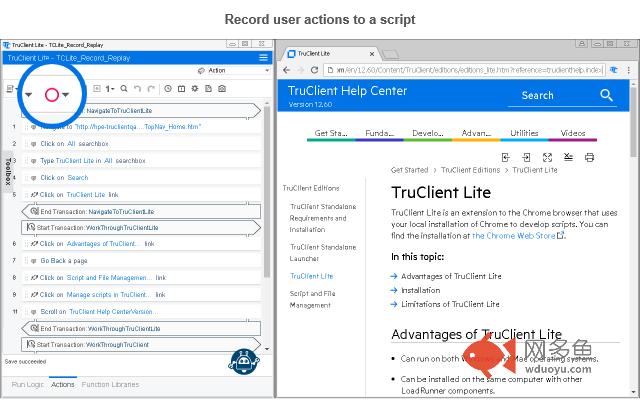
TruClient records your actions as you navigate through your business process and creates a script from your actions. The script can be enhanced with timing steps, by parameterizing step arguments, and in other ways.
Install and run TruClient Lite on a dedicated Chrome profile. This helps separate Chrome for daily use from Chrome for testing.
To create a dedicated profile for TruClient Lite for Chrome:
Windows OS:
1. Create a new Chrome short-cut.
2. Right-click the short-cut, and select Properties. In the Target field, add the following command line arguments:
--user-data-dir="
where the
--user-data-dir="C:\TCLiteChromeProfile" --extensions-on-chrome-urls --silent-debugger-extension-api --disable-web-security --no-first-run --disable-features=IsolateOrigins,site-per-process
3. Double click the short-cut to launch Chrome and install the TruClient Lite for Chrome extension.
Mac OS:
1. Open terminate, execute following command line, input root user password when asked.
sudo mkdir -p -m '+rwx' /Users/$USER/Applications/TCLiteChrome.app/Contents/MacOS/; cd /Users/$USER/Applications/TCLiteChrome.app/Contents/MacOS/; echo '#!/bin/bash' >> TCLiteChrome; echo "open /Applications/Google\ Chrome.app --args --user-data-dir='/Users/$USER/TCLiteChromeProfile' --profile-directory='/Users/$USER/TCLiteChromeProfile' --extensions-on-chrome-urls --silent-debugger-extension-api --no-first-run --disable-web-security --disable-features=IsolateOrigins,site-per-process" >> TCLiteChrome; chmod 755 TCLiteChrome; cd /Users/$USER/Applications/; chmod 755 TCLiteChrome.app; osascript -e 'tell application "Finder" to make alias file to POSIX file "/Users/'$USER'/Applications/TCLiteChrome.app" at POSIX file "/Users/'$USER'/Desktop"';
2. Double click the TCLiteChrome alias created on desktop to launch Chrome and install the TruClient Lite for Chrome extension.
其他信息
官方唯一标识:onkiafmn****************ogedfcpo
官方最后更新日期:2019年3月10日
分类:开发者工具
大小:3.94MiB
版本:12.62.715.0
语言:English
提供方:none
星级:5
插件下载
| 下载链接一 下载链接二 |
| Chrome插件离线安装教程 |
温馨提示
本站中的部份内容来源网络和网友发布,纯属个人收集并供大家交流学习参考之用,版权归版权原作者所有。
如果您发现网站上有侵犯您的知识产权的作品,请与我们取得联系,我们会及时修改或删除。
如果您觉得网多鱼对您有帮助,欢迎收藏我们 Ctrl+D。