TrackDuck tool for visual feedback
插件截图
插件概述
Simple way to leave visual feedback on any webpage插件详情
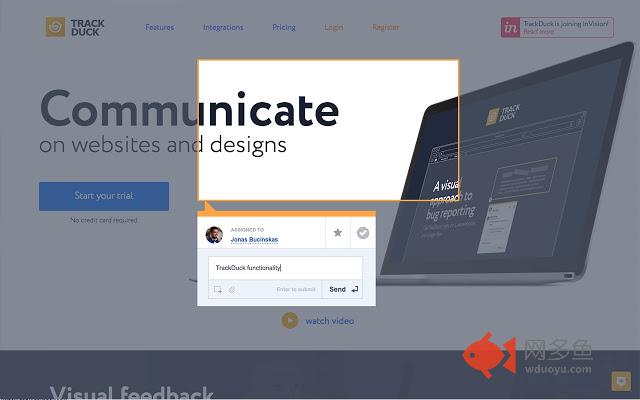
With TrackDuck extension you can leave feedback with screenshot on any website. Mark a part of a website or design, leave a comment - TrackDuck will take down a screen capture of the highlighted area and record browser version, OS and screen resolution automatically. Every comment with technical details is stored in a secure web app as a new task. You can also send tasks with screenshots and all the tech details to the most popular project management platforms, CMS and team collaboration tools.For TrackDuck extension to work you need to have an active TrackDuck account that can be registered at https://trackduck.com page. All new accounts have a free 14 day trial after which you can subscribe to one of TrackDuck plans. All payments for plans are handled by a secure TrackDuck payment system. TrackDuck does not use Chrome Web Store's built-in payment solution.
TrackDuck collects Personal Information through in the product to deliver the product features, conduct user support and payments for the TrackDuck plans. We collect the following personal information:
a) Contact Information;
b) Financial Account Information;
c) Transaction Information;
d) User Account Information;
e) User Content;
f) Partner Information; and
g) Service Information.
You can learn more how we handle and store this information in our Privacy Policy page https://trackduck.com/privacy-policy/
其他信息
官方唯一标识:ekhfapeh****************lhomfkek
官方最后更新日期:2018年3月19日
分类:开发者工具
大小:214KiB
版本:1.4.12
语言:English
提供方:https://trackduck.com
星级:4.6
插件下载
| 下载链接一 下载链接二 |
| Chrome插件离线安装教程 |
温馨提示
本站中的部份内容来源网络和网友发布,纯属个人收集并供大家交流学习参考之用,版权归版权原作者所有。
如果您发现网站上有侵犯您的知识产权的作品,请与我们取得联系,我们会及时修改或删除。
如果您觉得网多鱼对您有帮助,欢迎收藏我们 Ctrl+D。