SwissNow - ServiceNOW toolbox
插件截图
插件概述
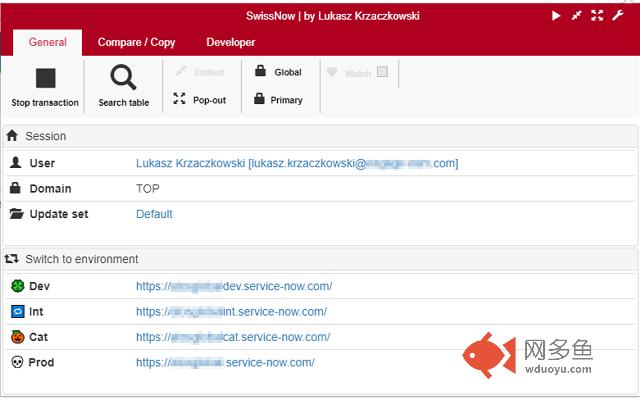
Swiss Knife for ServiceNOW. Lightweight toolbox for ServiceNOW.插件详情
Using SwissNow, you can:1. Check current logged in user
2. Check current selected Update Set
3. Check current selected Domain
4. Switch to the same record/view in another ServiceNow environment
5. View recent changes tracked in Update Sets
6. Add a prefix in your tab title - the prefix will indicate the environment you're connected to
7. Watch list. You can monitor a result of a list query. Once list content has been changed, you will receive a desktop notification from Chrome.
8. Embed current view in the ServiceNow UI. Pop-pop current view from the ServiceNow UI
9. Generate GlideRecord code for selected query
10. Compare the same record or the same list of records on different environments
11. Compare all related lists for particular record on different environments
12. Comparison of multi-line values (e.g. scripts) highlights changed lines
13. Comparison of all workflow activities on a list (wf_activity_list.do) includes activity variables (e.g. script in RunScript action)
14. Compare all rows/records in a list with each other
15. Edit background scripts locally, using your favourite IDE/editor (press CTRL-Enter to execute script)
16. Cancel your long-running blocking transactions
17. Search table by name
18. Context menu search global search
19. Configuration packages - export records from multiple tables into single file with just one click
20. Add arbitrary records to an update set
There is a separate version of the plugin for OnPrem instances.
其他信息
官方唯一标识:jneeammd****************jdmkdbjm
官方最后更新日期:2019年6月30日
分类:开发者工具
大小:769KiB
版本:0.9.26.5
语言:English
提供方:none
星级:5
插件下载
| 下载链接一 下载链接二 |
| Chrome插件离线安装教程 |
温馨提示
本站中的部份内容来源网络和网友发布,纯属个人收集并供大家交流学习参考之用,版权归版权原作者所有。
如果您发现网站上有侵犯您的知识产权的作品,请与我们取得联系,我们会及时修改或删除。
如果您觉得网多鱼对您有帮助,欢迎收藏我们 Ctrl+D。