Streak BigQuery Developer Tools
插件截图
插件概述
Development tools used internally at Streak.插件详情
Streak Developer Tools (for BigQuery)-------------------------------------------------------
The Streak BigQuery Developer Tools (SBDT) is a chrome extension that currently adds functionality to BigQuery (see features below) and in the future will add other tools used internally at Streak.com
BigQuery Tools
----------------------
1. Graph Results of a Query
The SBDT extension lets you graph the results of a query. The button appears next to the download as csv button. It currently only graphs the current results on screen, in a future release it will graph all results. It expects the first column to be a date and every other column after that to be a number.
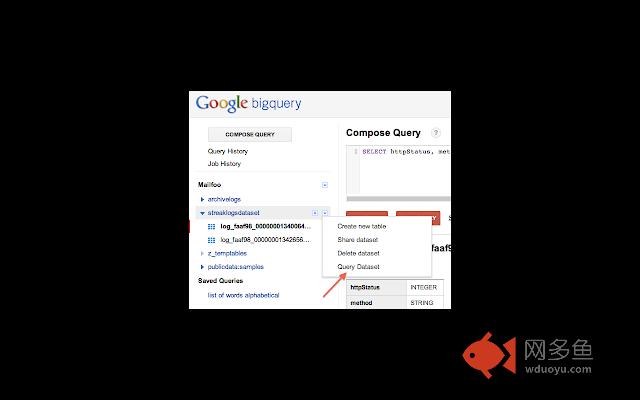
2. Query Across Datasets
Simply select "Query Dataset" and the query box will be filled in for you with all the tables in the dataset.
3.Show Cost of Each Query
Added the ability to see how much each query that you ran costs. Once the query completes, we added the cost (in US cents) next to the summary status of the query. The cost is calculated based on $0.035/GB processed.
4. Expand Multi-line Results
The SDT allows you to click on any result row and expand it to show multi-line strings. Simply click on the row number in the results table to toggle multi-line on and off.
In order to put multi-line strings into BigQuery, make sure that your line endings are '\r' and not '\n' as those aren't supported by BigQuery.
5. Automatically Convert Timestamps to Human Readable Format
AppEngine and BigQuery store timestamps as epoch time which is great for computers and computation, but not so good for a human to read. The extension automatically finds, parses and replaces epoch timestamps with a human friendly date/time rendering.
6. Insert All Columns into SELECT Statements
Sometimes you want to select every column in your query but typing each of them out manually takes time especially for tables with a large number of columns. In the schema description for a table, you'll see a new yellow field called "Add All Columns" which you can press to insert all of the column names into your query.
其他信息
官方唯一标识:lfmljmpm****************aldcihgd
官方最后更新日期:2016年8月4日
分类:开发者工具
大小:50.36KiB
版本:3.6
语言:English
提供方:streak.com
星级:4.7
插件下载
| 下载链接一 下载链接二 |
| Chrome插件离线安装教程 |
温馨提示
本站中的部份内容来源网络和网友发布,纯属个人收集并供大家交流学习参考之用,版权归版权原作者所有。
如果您发现网站上有侵犯您的知识产权的作品,请与我们取得联系,我们会及时修改或删除。
如果您觉得网多鱼对您有帮助,欢迎收藏我们 Ctrl+D。