Storage Area Explorer
插件截图
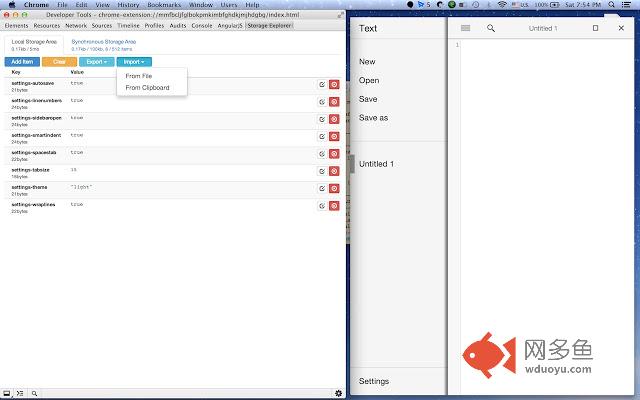
插件概述
Simple editor for Storage Area for Chrome Packaged Apps & Extensions插件详情
Devtools extension which provides GUI for chrome.storage in Chrome Apps & Chrome ExtensionsFind sources and report problems on Github: https://github.com/jusio/storage-area-explorer
Permissions explanation.
Extension doesn't access you data in any way, unless you open devtools and click on the tab with Storage Explorer.
Extension doesn't store or transmit any data to other sites.
Detailed permissions explanation.
-copy/paste is required in order to enable import/export directly to clipboard
-all data on your sites - this devtools extension, and therefore when you open devtools, only those pages are accessible
-tabs and browsing history- extension requires tabs permission, but it is only used when devtools are actually opened (permission is needed in order to work with local/session html storage)
Change Log:
*0.4.2
Fixed clear button not working properly for local/session storages
*0.4.1
Added support for Chrome Hosted Apps
*0.4.0
Added support for HTML5 local&session storage
Bugfixes
*0.3.2
Enabled panel are for chrome extensions with storage permission
Fixed broken import/export of values with newline/tab characters
*0.2.3*
Fixed broken import from clipboard
*0.2.2*
Features:
New design
Added possibility import&export data
Inline editing
Bug fixes:
JavaScript error was displayed when inspecting extension without storage permission
*0.1*
Initial release
其他信息
官方唯一标识:ocfjjjjh****************gfdecjkb
官方最后更新日期:2016年3月6日
分类:开发者工具
大小:128KiB
版本:0.4.2
语言:English
提供方:none
星级:4.5
插件下载
| 下载链接一 下载链接二 |
| Chrome插件离线安装教程 |
温馨提示
本站中的部份内容来源网络和网友发布,纯属个人收集并供大家交流学习参考之用,版权归版权原作者所有。
如果您发现网站上有侵犯您的知识产权的作品,请与我们取得联系,我们会及时修改或删除。
如果您觉得网多鱼对您有帮助,欢迎收藏我们 Ctrl+D。