SFDC Shortcuts
插件截图
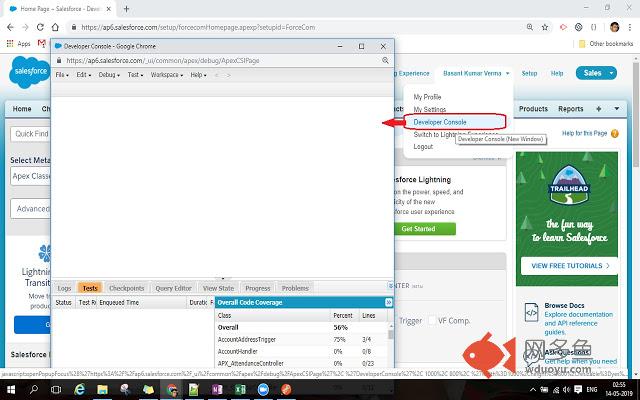
插件概述
Collections of useful shortcuts for Salesforce DEV and Admins. Such as alawys open SFDC Dev Console in a new tab and many more.插件详情
Collections of few useful shortcuts for Salesforce Developers and Admins.Such as
- Alawys open SFDC Dev Console in a new tab: Salesforce has retired the ability to open the developer console in a new tab, instead it opens in a new stripped window. This can be little annoying and hence I have built this extension to allow the opening of the developer console in a new tab.
- Quick navigation to setup: Provides keyboard short key allow navigation to Setup page.
- Quick switch to classic: Provides keyboard short key allow switching from Lightning to Classic experience.
*Features*
- Shortcuts for many useful navigation
- Works only Salesforce pages.
- Handles for both Classic and Lightning Experience
- Support Incognito mode
- Open new tab just after the active tab
- Does not open multiple tabs for same org
- Show alert notification for all unauthenticated Salesforce pages
*Tips*
Use short keys to quickly perform below actions
- Open Developer Console - Alt+Shift+D
- Navigate to Setup - Alt+Shift+S
- Switch to Salesforce Classic - Alt+Shift+C
- Open Extension's Options - Alt+Shift+O
NOTE: These are the default Shortcuts combination this extensions provides, Chrome allow users to change them as per user's need. So please make sure your local configuration for all these Shortcuts.
You can follow below steps to do that
- Go to Chrome settings (three dot button) -> More tools -> Extensions -> Shortcuts
- Scroll to the section for this extension and double check the configurations
其他信息
官方唯一标识:ipnmkbcc****************dcmdpaji
官方最后更新日期:2019年5月31日
分类:开发者工具
大小:25.79KiB
版本:2.130
语言:English
提供方:none
星级:5
插件下载
| 下载链接一 下载链接二 |
| Chrome插件离线安装教程 |
温馨提示
本站中的部份内容来源网络和网友发布,纯属个人收集并供大家交流学习参考之用,版权归版权原作者所有。
如果您发现网站上有侵犯您的知识产权的作品,请与我们取得联系,我们会及时修改或删除。
如果您觉得网多鱼对您有帮助,欢迎收藏我们 Ctrl+D。