SelAssist
插件截图
插件概述
Find all HTML element properties required for Selenium Webdriver automation插件详情
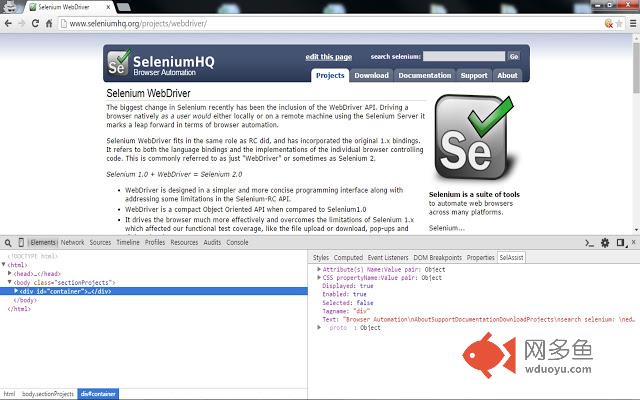
Using this extension find the properties of HTML element you intend to use in Webdriver automation code before even programming. So basically this eliminates the time involved in debugging the code to find the element's properties and modify code accordingly.Using SelAssist sidebar panel -
1. Open "Developer tools" by pressing F12 key(other options - https://developer.chrome.com/devtools#access).
2. Make sure that "Elements" panel is selected/active.
3. Make sure that "SelAssist" sidebar pane is active by clicking on it.
4. Select any HTML element in "Element" panel and corresponding properties are displayed in "SelAssist" sidebar pane.
Using SelAssist panel -
1. Same as first step above.
2. Select 'SelAssist' panel(which appears after Console panel)
3. Select the locator type (Id, Name, ClassName etc)
4. Type the query/value in textbox.
5. Count of matching elements, matching elements are displayed.
6. Hovering on a matching element will scroll to the element and highlight on webpage.
7. Clicking on a matching element will display that element in 'Element' panel.
8. Press 'Find' button or hitting enter key will highlight the first element in 'Elements' panel matching your criteria.
**Note :
1. This is based on W3C Webdriver spec available @ https://w3c.github.io/webdriver/webdriver-spec.html
2. This extension is still in development and few properties displayed may be inaccurate. Feel free to report on the support link.
3. This extension doesn't track UI changes and update accordingly. After UI has changed, reselect the HTML required element in "Elements" panel after clicking on other element or closing and reopening developer tools to get updated properties.
(Dedicated to all Selenium contributors & users)
-----------------------------
ver 0.0.3.8
Display matching element with pointer
ver 0.0.3.6
Scroll to element and highlight, on hovering on any matching element according to user's query(SelAssist panel).
Ver 0.0.3.5
Fixed to display text content in the matching element
Ver 0.0.3.4
Display matching elements according to user's query
Ver 0.0.3.3
Added support for "Link Text" & "Partial Link Text" in SelAssist panel
Ver 0.0.3.2
Display count of matching element(s)
Ver 0.0.3
Added new panel for inspecting path based on locator type
Ver 0.0.2
Added rect property of element in sidebar panel
其他信息
官方唯一标识:caghmpag****************ikiiemld
官方最后更新日期:2016年6月12日
分类:开发者工具
大小:83.8KiB
版本:0.0.3.10
语言:English (United States)
提供方:none
星级:4.6
插件下载
| 下载链接一 下载链接二 |
| Chrome插件离线安装教程 |
温馨提示
本站中的部份内容来源网络和网友发布,纯属个人收集并供大家交流学习参考之用,版权归版权原作者所有。
如果您发现网站上有侵犯您的知识产权的作品,请与我们取得联系,我们会及时修改或删除。
如果您觉得网多鱼对您有帮助,欢迎收藏我们 Ctrl+D。