Secure Logins
插件截图
插件概述
Single click secure login for your salesforce(force.com), netsuite, jira(atlassian) accounts.插件详情
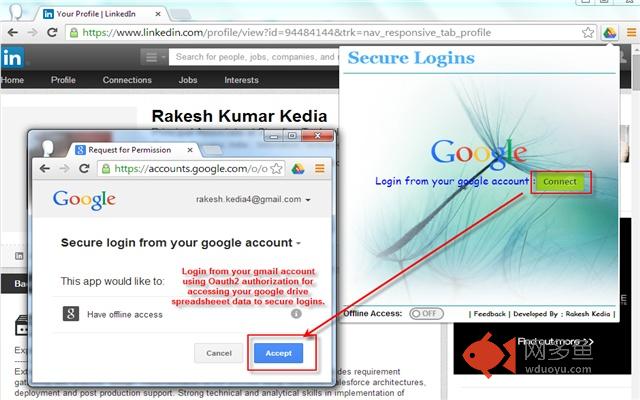
This extension provides ‘Single click secure login for your salesforce (Force.com), Netsuite, Jira(Atlassian) accounts and keep your data secure in google drive. Each google account has maintain a separate file and you can access specific file from login your google account.What is New?:
--------------------
Yes, This type of extensions are already available in chrome store and they have stored your useful credentials in your local machine and provide a login through url without hiding your username & password but this extension is purely safe & secure for Salesforce, Netsuite & Jira users and its keep your data highly secure by google.
List of Features:
--------------------
1. One time secure login from your google account with OAuth2 Authorization.
2. Have a separate logout button, to keep your session active after your google account sign out.(Not required login from your google account again & again)
3. Keep your all data username, password, security token etc. in your google drive spreadsheet. These data’s are highly secured by google.
4. You can easily access this spreadsheet and for future backup storage you can also download it from your google drive account.
5. Whenever you want to uninstall your extension from chrome browser, your spreadsheet file still stored in your google drive for future use. This same file you can use for new installation or different location on different machines. So from your same google account login you can access this file.
6. This extension also provide a features to maintain your sheet from GUI. You can create, edit, and delete your Salesforce, Netsuite & Jira accounts from the UI forms.
7. Provides a safe single click Salesforce, Netsuite & Jira login in a new tab or new window. It never show your username, passwords in url and never store your credentials in browser bookmark history.
8. Secure offline access for fast execution.
9. Tabbed view for Salesforce, Netsuite & Jira accounts.
For any bug’s, suggestion’s and idea’s you can contact on below details. Your every point is most important for us. Thanks !!
Author Details: Rakesh Kedia
---------------------------------
Email : rakesh.kedia4@gmail.com
LinkedIn Profile : http://in.linkedin.com/pub/rakesh-kumar-kedia/27/786/3a8
Facebook Profile : http://facebook.com/rakesh.kedia4
Google+ Profile : https://plus.google.com/+RakeshKumarKedia/about
Note: we can hide google drive spreadsheet file and data but not do this becuase we want to make this more user friendly.
其他信息
官方唯一标识:mdhehldo****************bnfgbkpn
官方最后更新日期:2018年5月17日
分类:开发者工具
大小:206KiB
版本:8.4
语言:English (United States)
提供方:none
星级:3.9
插件下载
| 下载链接一 下载链接二 |
| Chrome插件离线安装教程 |
温馨提示
本站中的部份内容来源网络和网友发布,纯属个人收集并供大家交流学习参考之用,版权归版权原作者所有。
如果您发现网站上有侵犯您的知识产权的作品,请与我们取得联系,我们会及时修改或删除。
如果您觉得网多鱼对您有帮助,欢迎收藏我们 Ctrl+D。