SdbNavigator
插件截图
插件概述
SdbNavigator is a free and open source Amazon SimpleDB Administration Interface. More info on http://www.kingsquare.nl/sdbnavigator插件详情
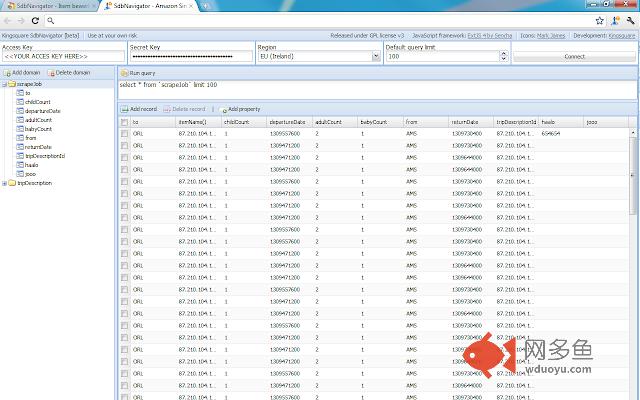
SdbNavigator is a free and open source Amazon SimpleDB web interface.* No server-side scripts needed: do everything from your browser
* Manage domains, Create, Read, Update and Delete
* Manage records, Create, Read, Update and Delete
* Find records using your own queries, or by sorting on properties
* Quickly edit records using a convenient interface
* Convenient interface like PhpMyAdmin.
Usage
-----
To make the data more manageable, SdbNavigator uses a 'virtual schema' for a schema-less database.
* Fire up Google Chrome and the plugin
* Open a new tab
* Sign in for your AWS amazon account at https://aws-portal.amazon.com/gp/aws/developer/account/index.html?action=access-key
* Copy and paste the "Access Key ID" and "Secret Access Key" into the corresponding fields on the plugin-page
* Choose your nearest Region.
* Click connect
* Now choose a domain on the left-hand side, or create a new one.
* Add some properties to the selected domain (if they could not be retrieved by scanning existing records)
* Start adding new records using the defined properties
PLEASE NOTE that your AWS credentials will be stored in a local cookie so don't use this plugin on any public computer. This free, beta software is released under GPL v3 and comes with absolutely no warranty. Make sure you have backup of important data before using this software.
SdbNavigator uses Sencha's ExtJS 4 as JavaScript and UI framework with icons by famfamfam.com.
More info on http://www.kingsquare.nl/sdbnavigator
Source hosted on Github https://github.com/Kingsquare/sdbnavigator
其他信息
官方唯一标识:ddhigekd****************afacphgg
官方最后更新日期:2017年5月29日
分类:开发者工具
大小:1.81MiB
版本:2.0.8
语言:English (United States)
提供方:kingsquare.nl
星级:4.4
插件下载
| 下载链接一 下载链接二 |
| Chrome插件离线安装教程 |
温馨提示
本站中的部份内容来源网络和网友发布,纯属个人收集并供大家交流学习参考之用,版权归版权原作者所有。
如果您发现网站上有侵犯您的知识产权的作品,请与我们取得联系,我们会及时修改或删除。
如果您觉得网多鱼对您有帮助,欢迎收藏我们 Ctrl+D。