Salesforce Coding Utility
插件截图
插件概述
An utility for Apex Class,VF Pages, Apex Trigger,Components and debugs.插件详情
This extension provides you following features:1. Code in maximized window:
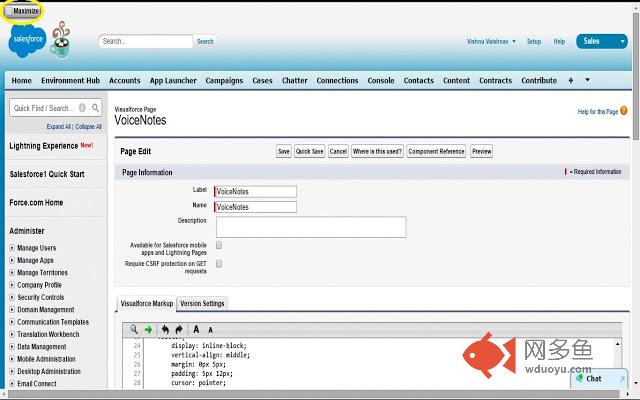
We can code in Developer console and Setup tab(Like VisualForce Pages, Apex Classes, Apex Triggers, Visualforce Components). In Developer Console, we can code in maximized window but using the Setup tab we don’t have an option to maximize the window. In this case, it is difficult to code and see compile time errors on the page.
Using this extension you just need to check the Maximize checkbox, which will appear on the top-left corner. You can minimize the window just by unchecking the Maximize checkbox.
2. View only debugs: If you are looking debugs from Developer console. Then we have Debug Only checkbox. Same thing you can do on apex debugs page using this extension. You need to just check the Debugs checkbox to see only debugs.
3. Clear All Button: In salesforce sometimes we have lots of Debugs generated. Salesforce provides a button “Delete All” but it deletes only one page of debugging at a time. This extension will give you a “Clear All” button next to Delete All button. This button will delete all debugs. You just need to click on this button it will delete all debugs one by one. You don’t need to click Delete All button again and again.
其他信息
官方唯一标识:noiijdfi****************fdmghbgf
官方最后更新日期:2018年10月22日
分类:开发者工具
大小:270KiB
版本:1.0
语言:English
提供方:www.0to1code.com
星级:4.8
插件下载
| 下载链接一 下载链接二 |
| Chrome插件离线安装教程 |
温馨提示
本站中的部份内容来源网络和网友发布,纯属个人收集并供大家交流学习参考之用,版权归版权原作者所有。
如果您发现网站上有侵犯您的知识产权的作品,请与我们取得联系,我们会及时修改或删除。
如果您觉得网多鱼对您有帮助,欢迎收藏我们 Ctrl+D。