Reload All Tabs
插件截图
插件概述
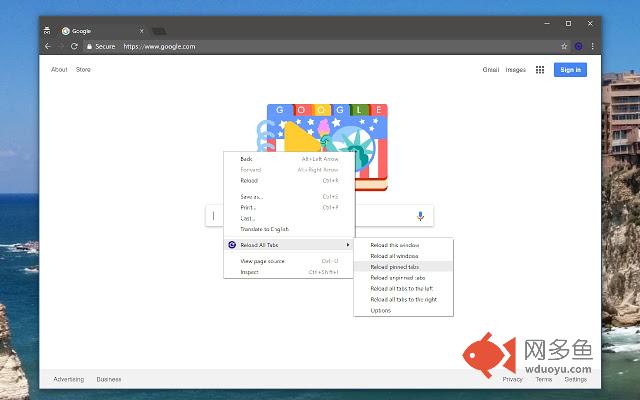
Reload All tabs using keyboard shortcut(alt + shift + r), context menu, or browser action button.插件详情
If you want to remove the browser action button (top right), just right click and choose "Hide button".FOLLOW ME ON TWITTER: https://twitter.com/mohamedmansour
SOURCE CODE: http://goo.gl/dGDD (GitHub)
Ways to Reload All Tabs:
- Right click, choose "Reload this window", you can add more options, read next section.
- The Blue arrow Icon on the Extension Bar top right (Click on it)
- Keyboard Shortcut: Alt+Shift+R
Add more Context Menus Configurable in Options (enable whatever you want):
- Reload all tabs in current window
- Reload all tabs in all windows
- Reload only pinned tabs in current window
- Reload only unpinned tabs in current window
- Reload all tabs to the left
- Reload all tabs to the right
Modify the Keyboard Shortcut:
- To make it even more secure, we removed all content script permissions, and used chrome commands instead.
- Visit chrome://extensions/shortcuts in Chrome to update the combination to anything you want!
其他信息
官方唯一标识:midkcinm****************boeonkam
官方最后更新日期:2018年7月29日
分类:开发者工具
大小:24.33KiB
版本:4.2.0
语言:English
提供方:mohamedmansour.com
星级:4.5
插件下载
| 下载链接一 下载链接二 |
| Chrome插件离线安装教程 |
温馨提示
本站中的部份内容来源网络和网友发布,纯属个人收集并供大家交流学习参考之用,版权归版权原作者所有。
如果您发现网站上有侵犯您的知识产权的作品,请与我们取得联系,我们会及时修改或删除。
如果您觉得网多鱼对您有帮助,欢迎收藏我们 Ctrl+D。