Open TortoiseSVN for Google Chrome™
插件截图
插件概述
Extension to open a file directly in TortoiseSVN instead of in the browser.插件详情
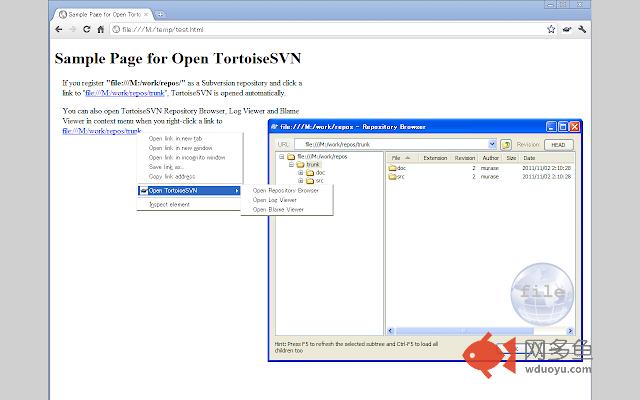
This extension enables you to open a file directly in TortoiseSVN instead of in the browser.When you click on a link to one of the registered URLs, TortoiseSVN Repository Browser will open.
This extension also displays some contextual menus to open TortoiseSVN Repository Browser, Log Viewer and Blame Viewer when right clicking on a URL.
This extension is a Google Chrome™ version of "Open TortoiseSVN" for Firefox, https://addons.mozilla.org/en-US/firefox/addon/open-tortoisesvn/
If you use Redmine and install Add Subversion Links plugin, http://www.redmine.org/plugins/add_subversion_links, on the Redmine server, you can open the log of the specific revision easily.
This extension needs installation of TortoiseSVN.
Set the path of TortoiseProc.exe in option page before you use this extension.
You can use this extension under MIT License.
===
Change Log
* 2.0.2
Uses SVG images as help tips.
* 2.0.1
Uses static images as help tips.
* 2.0.0
Supports Event Page to reduce memory consumption.
* 1.0.1
Show warning in badge.
* 1.0.0
Use Native Messaging.
* 0.0.6
Change manifest version.
* 0.0.5
Support pages loaded in iframe.
* 0.0.4
Add action for each extension.
* 0.0.2
Add default TortoiseSVN action.
* 0.0.1
Initial Release
其他信息
官方唯一标识:mhhincgn****************nahapihn
官方最后更新日期:2016年1月17日
分类:开发者工具
大小:306KiB
版本:2.0.2
语言:支持2种语言
提供方:masamitsu-murase.blogspot.com
星级:3.5
插件下载
| 下载链接一 下载链接二 |
| Chrome插件离线安装教程 |
温馨提示
本站中的部份内容来源网络和网友发布,纯属个人收集并供大家交流学习参考之用,版权归版权原作者所有。
如果您发现网站上有侵犯您的知识产权的作品,请与我们取得联系,我们会及时修改或删除。
如果您觉得网多鱼对您有帮助,欢迎收藏我们 Ctrl+D。