LazySec
插件截图
插件概述
Quickly removes HTML UI validations for back-end validation testing插件详情
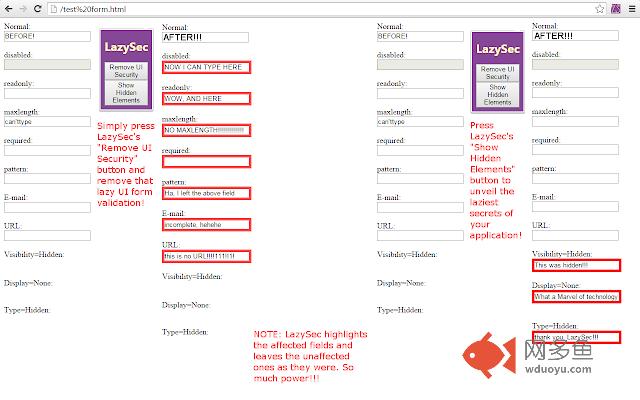
DESCRIPTION:LazySec is a very simple tool designed for software testers but of general use. It helps in the task of testing Lazy Security implementations, hence the name, in the UI and revealing a pages' Lazy Secrets, hence the name II, by accomplishing these two things:
UNLOCK ELEMENTS: The extension unlocks all elements of a webpage by taking away some attributes, namely "disabled", "readonly", "maxlength", "required" and others related to form validations. In simple English: this will allow you to write on forbidden fields or write forbidden things. To do this hit LazySec's "Remove UI Security" button.
VIEW HIDDEN ELEMENTS: The extension makes visible those elements hidden by the "display:none", "type=hidden", and "visibility=hidden" attributes / styles. To do this hit LazySec's "Show Hidden Elements" button.
WHY LazySec?
+ I don't like opening the console nor "going hunting" by inspecting the page's DOM
+ Many project managers or Software Architects defend lazy security thingies by stating that unlocking elements of a webpage is something only a "very knowledgeable" or "tech savvy" user can do. Well, now every average Joe with LazySec can do it, so you better watch out!!
HOW TO CONTRIBUTE TO LazySec AND THE WORLD:
+ Use the tool and send cool suggestions.
+ If you think of other actions to add to LazySec just send them in, they will be greatly appreciated and properly acknowledged.
+ Send a word of thanks, it will make me happy and improve LazySec's karma.
ABOUT THE ICON:
I thought I'd let you know what the icon actually is just in case you are not used to watching Picasso's or Dali's all of the time. It is an L and an S like this "LS", but it can also be interpreted as a face shooting an eye beam from the unseen eye. Pretty cool, huh? Can't unsee now.
MEA CULPA: It is acknowledged that certain "harm" or malicious use could result of the use of this extension to silly web pages that implement lazy security. However, what this extension achieves is perfectly achievable from the browser itself, by inputting javascript on the console. This extension is for testers to avoid trying to enable each field one by one or fiddling with the HTML to find hidden objects. If your web page or web application was "h4ck3d" using LazySec then don't rage at me, simply tell your testers to use it for testing, or test it yourself. I provide this tool free of charge, hope you like it. All in all, this extension was made so that web applications' security and validations are implemented in a more serious way. Or at least, not in a LazySec way.
其他信息
官方唯一标识:llegephe****************kfmgeggp
官方最后更新日期:2015年8月13日
分类:开发者工具
大小:17.87KiB
版本:0.2.0.0
语言:English
提供方:none
星级:5
插件下载
| 下载链接一 下载链接二 |
| Chrome插件离线安装教程 |
温馨提示
本站中的部份内容来源网络和网友发布,纯属个人收集并供大家交流学习参考之用,版权归版权原作者所有。
如果您发现网站上有侵犯您的知识产权的作品,请与我们取得联系,我们会及时修改或删除。
如果您觉得网多鱼对您有帮助,欢迎收藏我们 Ctrl+D。