Katalon Recorder
插件截图
插件概述
Selenium-based automation scripts recorder & code generator. Provides reports & screenshots. Fast & open-sourced.插件详情
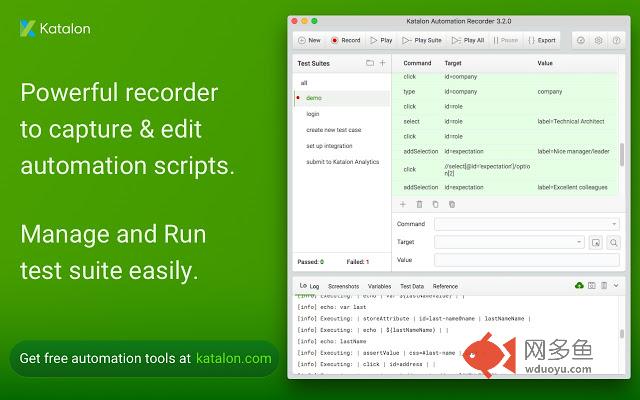
Katalon Automation Recorder is the best automation recorder that helps you export Selenium WebDriver code. You can also record actions, capture web elements on web applications, play automated test cases, and do reporting quickly and easily. Katalon Recorder supports the legacy Selenium IDE's commands and extension scripts (AKA user-extensions.js) for developing custom locator builders and actions.** Don't forget to check out other free testing solutions from Katalon at https://www.katalon.com.
Katalon Recorder will make your test automation work a lot easier.
* Record, play, debug with speed control, pause/resume, breakpoints capabilities.
* Enjoy fastest execution speed compared to other extensions with Selenium 3 core engine.
* Make use of multiple locator types including XPath & CSS.
* Use original Selenium IDE commands (Selenese), plus block statement if...elseIf...else...endIf and while...endWhile. Testing file input control is supported.
* Import test data from CSV files for data-driven testing.
* Report easily with logs, screenshots capturing, with historical data and analytics from Katalon Analytics.
* Compose & organize test cases in suites. Never get your work lost with autosave feature.
* Import original Selenium IDE (Firefox extension) tests.
* Export to Selenium WebDriver scripts in these frameworks: AppDynamics (Python), C# (MSTest and NUnit), Java (TestNG and JUnit), New Relic Synthetics (JavaScript), Ruby (RSpec), Python (unittest), Katalon Studio (Groovy), Robot Framework, XML, and Protractor.
* Plugin platform to extends Katalon Recorder capabilities. Read more at https://forum.katalon.com/discussion/5501/introduce-plugin-platform-in-katalon-recorder-3-4-0.
* Support old Selenium IDE's user-extensions.js https://forum.katalon.com/discussion/6286/we-have-released-katalon-recorder-3-5-0-with-support-for-extension-scripts-aka-user-extensions-js.
Katalon Recorder is available with latest Firefox and Chrome browsers. Development is very active with new version automatically updated weekly.
Useful links:
* Release notes https://docs.katalon.com/x/JwHR
* Samples https://docs.katalon.com/x/KQHR
* Katalon Recorder vs Katalon Studio comparison https://docs.katalon.com/x/cAHR
Katalon Recorder can integrate with Katalon Studio (completely free desktop application) to provide advanced automated testing:
* Test cases can be imported into Katalon Studio, a free testing solution supports Data-driven, Keyword-driven, TDD/BDD, Parallel execution and CI integration with Automation Reports.
* Record actions and capture web elements on any active browsers directly from Katalon Studio.
Katalon Studio is one of the top 10 test automation tools and is powering automated test cases from thousands of companies worldwide.
About Us:
This extension was the champion project of Katalon Studio (https://www.katalon.com/) Hackathon contest.
We also offer Katalon Studio – a free and complete automation testing solution for API, Web and Mobile testing with modern methodologies (Data-Driven Testing, TDD/BDD, Page Object Model, etc.) as well as advanced integration (JIRA, qTest, Slack, CI, Katalon Analytics, etc.). Learn more about Katalon Studio features at https://www.katalon.com.
Katalon team involves test automation enthusiasts who are passionate about providing the best yet free automation testing tool to the community.
Their product, Katalon Studio, is a free automation solution for API, Web and Mobile testing, built on top of Selenium and Appium. Katalon Studio has been a successful solution for numerous automation projects ranging from small team to enterprise client. It is also listed as the Best 10 automation testing tools for 2018 and recognized among the top Selenium IDE's alternatives.
其他信息
官方唯一标识:ljdobmom****************kpialdid
官方最后更新日期:2019年7月10日
分类:开发者工具
大小:1.58MiB
版本:3.8.0
语言:English (United States)
提供方:none
星级:4.5
插件下载
| 下载链接一 下载链接二 |
| Chrome插件离线安装教程 |
温馨提示
本站中的部份内容来源网络和网友发布,纯属个人收集并供大家交流学习参考之用,版权归版权原作者所有。
如果您发现网站上有侵犯您的知识产权的作品,请与我们取得联系,我们会及时修改或删除。
如果您觉得网多鱼对您有帮助,欢迎收藏我们 Ctrl+D。