Illuminations
插件截图
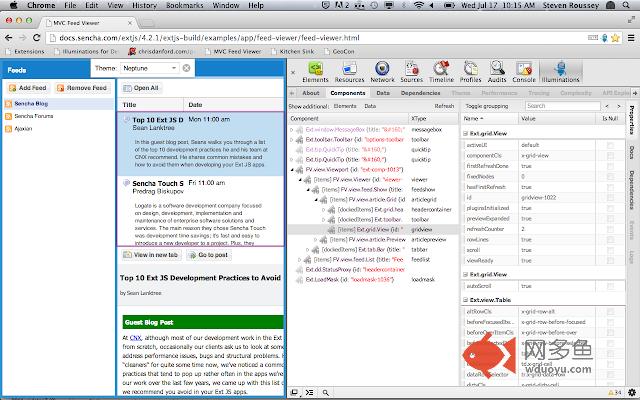
插件概述
Illuminating the web, one framework at a time... see how the web really works!插件详情
A browser extension that takes JavaScript frameworks and makes their internals visible, including views, models, class names, and more.Element Highlighting
Now, when you hover the mouse over a widget or view, it will highlight the component on the page. It shows you exactly what that object is all about.
Contextual Menu
When you right click on an element in Chrome, it adds an "Inspect" menu item to open the DevTools and bring you to that element in the Elements panel. Illuminations does the same sort of thing, but tries to find the best match: ideally some sort of UI widget, else an Element or jQuery object.
Illumination Panel
There is a new panel added to Chrome DevTools called Illuminations. This Illuminations panel is the place to inspect framework objects: Widgets/Views, Data (stores, collections, records, fields), and Elements. These views show the hierarchical structure of your code. It really takes some playing around with all of the above to get a feel of how useful and fun debugging can be again.
Side panels include Properties (sorted by the object that defined the property) and Docs that will bring up documentation for the component you are looking at!
And whatever you click on can be found in the $l variable in the console -- which is awesome if all the references to that object are hidden in JavaScript closures!
其他信息
官方唯一标识:hbhnkfhb****************kimflibk
官方最后更新日期:2016年3月13日
分类:开发者工具
大小:1.07MiB
版本:2.0.2016.312
语言:English
提供方:www.illuminations-for-developers.com
星级:4.3
插件下载
| 下载链接一 下载链接二 |
| Chrome插件离线安装教程 |
温馨提示
本站中的部份内容来源网络和网友发布,纯属个人收集并供大家交流学习参考之用,版权归版权原作者所有。
如果您发现网站上有侵犯您的知识产权的作品,请与我们取得联系,我们会及时修改或删除。
如果您觉得网多鱼对您有帮助,欢迎收藏我们 Ctrl+D。