Hover inspector like in Zeplin , Figma
插件截图
插件概述
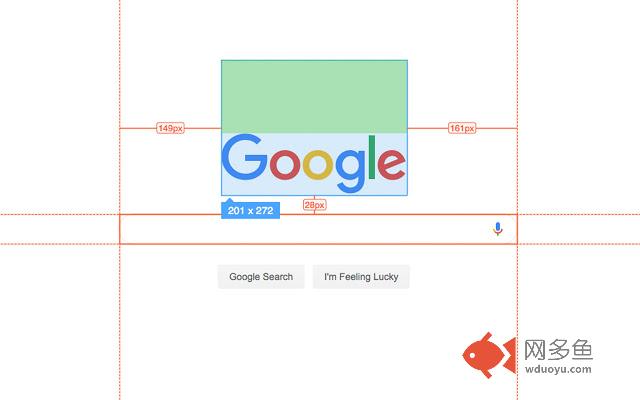
Inspector is the tool which mimic display dimension between selected and hover element. It would be good for designers, QA插件详情
Extension behavior closed like in Zeplin, Figma.New update(v1.1.0) contain highline padding(green color) and margin(orange color).
***
If you decide install this extension, could you left a comment. It would be very useful for me, because I want to improve this small application and fix what really important for you. Thanks :)
***
Planed functionality and work
- fix bugs
- [maybe] add possibility change padding and margin in topbar
version 1.1.0
- add highline padding and margin
- fix bugs
version 1.0.5.1
- minify file for more faster loading
version 1.0.5
- add top bar with styles(padding, margin, font-size, height, width) for hover and selected element
- fixed bugs (when user scroll label and lines position not display correctly)
- add change style for label which display height and width hovered element
- change active and regular icon:
- add 2 hotkeys:
-- command + enter / ctrl + enter - for hide/show topbar
-- esc for close extension
version 1.0.4
- add functionality when start scroll
- change color of labels
- add dimension calculating when selected located in hovered element
version 1.0.3
- add dimension calculating when hovered located outside selected element
其他信息
官方唯一标识:jbhnejnd****************baaehpln
官方最后更新日期:2019年6月9日
分类:开发者工具
大小:40.49KiB
版本:1.1.0
语言:English
提供方:none
星级:5
插件下载
| 下载链接一 下载链接二 |
| Chrome插件离线安装教程 |
温馨提示
本站中的部份内容来源网络和网友发布,纯属个人收集并供大家交流学习参考之用,版权归版权原作者所有。
如果您发现网站上有侵犯您的知识产权的作品,请与我们取得联系,我们会及时修改或删除。
如果您觉得网多鱼对您有帮助,欢迎收藏我们 Ctrl+D。