gTalk Syntax Highlighting
插件截图
插件概述
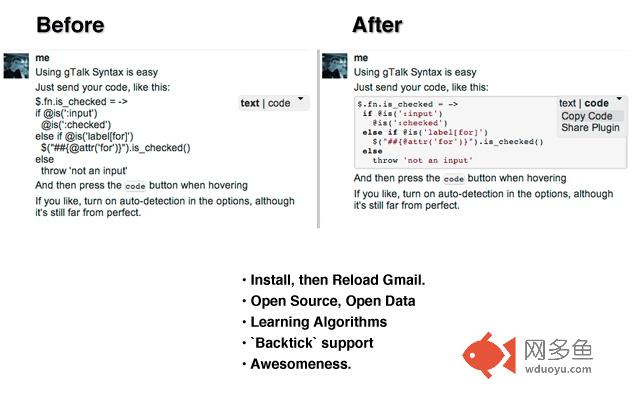
Automatic Syntax Highlighting for gChat.插件详情
This plugin automatically detects when you type code whilst conversing with google talk, and adds syntax highlighting to it.- Allows inline code blocks with `backticks`
- Detects code presence, and correct way to highlight said code.
- Has a manual control, for cases where the auto-detection fails.
- Optionally attach your own machine-learning server.
- Project page on github: https://github.com/pehrlich/GTalkSyntax
Important: You must reload your GMail tab after first installing this plugin. Once you do, any chat will auto-highlight code!
CHANGES:
0.3.0 (accessories release)
- Copy to clipboard, link to this plugin, in a lightly styled menu
- Now supports gTalk with "Pictures in chat" labs extension turned off
- Donate button, toggle switch, and fork banner on options page
- Google analytics for click events
- Sexy new icon.
其他信息
官方唯一标识:okpdnaeo****************fmmdoool
官方最后更新日期:2013年2月16日
分类:开发者工具
大小:548KiB
版本:0.3.4
语言:English
提供方:none
星级:3.4
插件下载
| 下载链接一 下载链接二 |
| Chrome插件离线安装教程 |
温馨提示
本站中的部份内容来源网络和网友发布,纯属个人收集并供大家交流学习参考之用,版权归版权原作者所有。
如果您发现网站上有侵犯您的知识产权的作品,请与我们取得联系,我们会及时修改或删除。
如果您觉得网多鱼对您有帮助,欢迎收藏我们 Ctrl+D。