ElasticSearch Query builder
插件截图
插件概述
ElasticSearch Query Builder插件详情
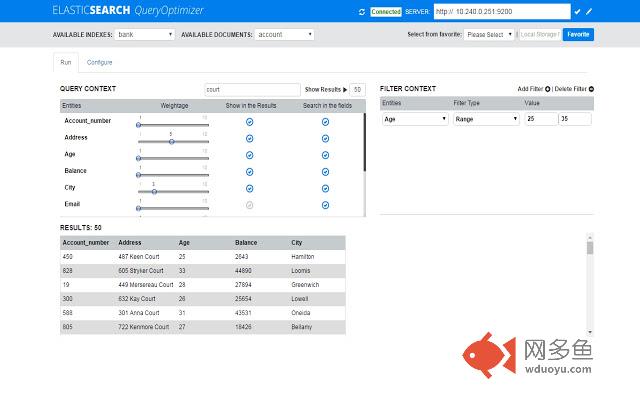
This chrome extension provides easy to use interface to configure different weightage and dynamically boost the search results for a selected fields.This will reduce the learning curve by giving Index settings and document mappings required to obtain the desired search results.It also builds the query for you to reduce the development time by running the same query in the ES and show you the result in the Result panel.One can change the settings at run time to fine-tune the search results and save all the setting under favorite for later use.
Connecting to ElasticSearch Server :
Mention the host and port (10.240.0.251:9200) on which the ES is running and press the connect button .
Building the Query :
Once it is connects to the server, it will list all the Indexes and their corresponding document under the available Indexes and documents drop-down.
Select the document for which you want to build the query.Now,under the configure tab you can see list of all the fields of the selected document.
options under Configure Tab
Dynamic Score: It is used to boost a particular record from multiple matching records that has the value defined in the booster field in addition to the search keyword.
Search In Same order : This will give priority to the words that are found in the same order as oppose to be found in the same line in different order.
Special Characters : This will allow the search of a alpha numeric, camelCase, and words separated with special characters like (_,- etc).
Generate Query : Based on the selected options,it will dynamically generate the required Index setting,document mappings and build query.
Options under Configure Tab
Weightage: This is used to give a priority to a field ,if same word is found in multiple fields. The record having higher score for the given field will be given more priority and come at the top.
Filter: This is used to filter out the results received from query.If any filter is selected along with value ,only those records will be shown which fulfills filter criteria .
Filters like (must, range) can be added/deleted on different numeric fields by pressing on the +/- button
Show in the Results: This allow to configure the fields that ,one wants to see in the results You can choose number of result to be displayed along with the field that you want to see by default first five fields are shown. You can select any fields as per your requirement. The results of the query will be shown in a table.
Search in the Fields : This allow the user to select the document fields which should be searched for the given query.
Show Results: This button will take the words to be searched along with the maximum size of the results to be shown and build a dynamic query ,which is fired against the select document Index and it will fetch the result and show under the results panel.
其他信息
官方唯一标识:cioobgbm****************deijdibp
官方最后更新日期:2016年12月6日
分类:开发者工具
大小:590KiB
版本:0.0.2
语言:English
提供方:none
星级:2.4
插件下载
| 下载链接一 下载链接二 |
| Chrome插件离线安装教程 |
温馨提示
本站中的部份内容来源网络和网友发布,纯属个人收集并供大家交流学习参考之用,版权归版权原作者所有。
如果您发现网站上有侵犯您的知识产权的作品,请与我们取得联系,我们会及时修改或删除。
如果您觉得网多鱼对您有帮助,欢迎收藏我们 Ctrl+D。