XV — XML Viewer
插件截图
插件概述
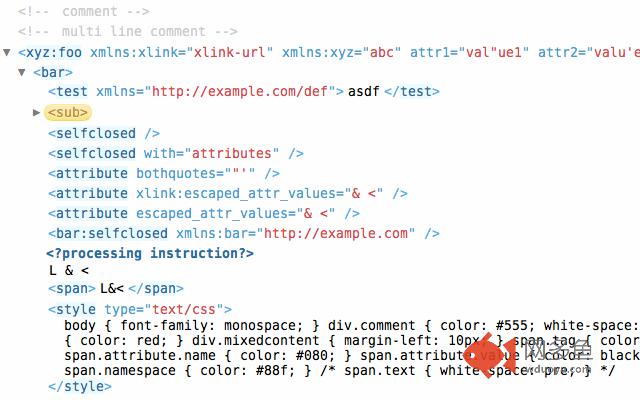
Powerful XML viewer for Google Chrome插件详情
XV is an XML viewer for Google Chrome. Online demo: http://media.chikuyonok.ru/xmlview/New in version 1.1.0:
Bugfixes and improvements for current Chrome version
New in version 1.0.13:
This release should fix issues introduced in Chrome 27
New in version 1.0.8:
Added support of Web Intents that allows users to pick XV as RSS and ATOM feeds viewer
New in version 1.0.7:
XV plugin is can intercept RSS and ATOM feeds and render them as XML. To enable this feature, you should go to extension’s Options page and check “Intercept requests for XML, RSS and ATOM documents” option.
New in version 1.0.5:
* Fixed outline display
+ Added page action (in address bar) to try to render current document, served with invalid content-type, with XV plugin.
*** Version 1.0.3 overrides native XML tree viewer in Chrome 11.x. There might be a flash of native viewer (depends on XML size), this may be fixed in future versions of Google Chrome only. ***
Features:
* Collapsable elements: Alt+click to expand/collapse all descendant elements. Double-click on opening or closing tag to collapse it.
* Outline for better document overview
* Search by name or XPath. By default uses simple search mode which looks for a partial match in element‘s or attribute’s name; use special symbols like '/' or '[' to search by XPath
* Quick XPath mode: hold down Command (Mac) or Ctrl (PC) key while moving mouse cursor over element‘s or attribute’s name to enter Quick XPath mode. Use Shift key to cycle through available XPath variants and then drag’n’drop element under cursor into text editor, click on element will copy XPath to clipboard
Source code is available at http://github.com/sergeche/xmlview/
其他信息
官方唯一标识:eeocglpg****************ebgmgddk
官方最后更新日期:2018年2月20日
分类:开发者工具
大小:56.2KiB
版本:1.1.6
语言:English
提供方:none
星级:4
插件下载
| 下载链接一 下载链接二 |
| Chrome插件离线安装教程 |
温馨提示
本站中的部份内容来源网络和网友发布,纯属个人收集并供大家交流学习参考之用,版权归版权原作者所有。
如果您发现网站上有侵犯您的知识产权的作品,请与我们取得联系,我们会及时修改或删除。
如果您觉得网多鱼对您有帮助,欢迎收藏我们 Ctrl+D。