Developer Cookie
插件截图
插件概述
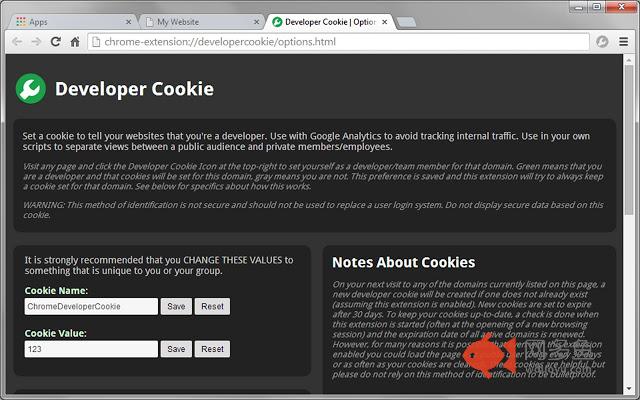
Set a cookie to tell your websites that you're a developer. Use with Google Analytics to avoid tracking internal traffic.插件详情
From any website, simply click on the Developer Cookie Icon in your browser to set yourself as a developer/team member for that domain. Green means that you are a developer and that cookies will be set for this domain, gray means you are not. This preference is saved and this extension will try to always keep a cookie set for that domain.The "name" and "value" of the cookie that gets created can (and should) be customized to be unique to you or your organization.
A list of all of your active domains can be found on the Options page, where domains can be easily added or removed as needed. There is also a button here to clear any cookies that have been saved on your device. Right-click the Developer Cookie Icon in your browser and select "Options" to access this page any time. Alternatively, you can find a link to this page in your Extensions manager.
••• How to Use •••
In your scripts, check for this cookie before performing certain actions.
JavaScript example:
- - - - - - - - - - - - - - - - - - - - - - - - - - -
var devCookie = "ChromeDeveloperCookie=123";
if (document.cookie.indexOf(devCookie) !== -1) {
// I am a developer
// Show control panel, debug info, etc.
} else {
// I am NOT a developer
// Insert Google Analytics code here, etc.
}
- - - - - - - - - - - - - - - - - - - - - - - - - - -
PHP example:
- - - - - - - - - - - - - - - - - - - - - - - - - - -
$devCookie = @$_COOKIE["ChromeDeveloperCookie"];
if ($devCookie === "123") {
// I am a developer
// Show control panel, debug info, etc.
} else {
// I am NOT a developer
// Insert Google Analytics code here, etc.
}
- - - - - - - - - - - - - - - - - - - - - - - - - - -
••• Notes About Cookies •••
On your next visit to any of the domains in your list, a new developer cookie will be created if one does not already exist (assuming this extension is enabled). New cookies are set to expire after 30 days. To keep your cookies up-to-date, a check is done when this extension is started (often at the opening of a new browsing session) and the expiration date of all active domains is renewed. However, for many reasons it is possible that even with this extension enabled you could load the page as a public user (once every 30 days or as often as your cookies are cleared). These cookies are very helpful, but please do not rely on this method of identification to be bulletproof.
Activating a domain applies to all pages on that domain, so clicking the icon while viewing any page on "http://www.example.com/" will cause your cookie to be set for all of the following:
- http://www.example.com/page1.html
- http://www.example.com/subfolder/page2.html
- http://example.com/page1.html
- and so on...
However, cookies set for "example.com" will NOT be present on "beta.example.com" and vice versa. Each new sub-domain can be added or removed with a single click.
WARNING: This method of identification is not secure and should not be used to replace a user log-in system. Do not display secure data based on this cookie.
其他信息
官方唯一标识:lknhpplg****************npahfikn
官方最后更新日期:2014年6月19日
分类:开发者工具
大小:35.61KiB
版本:1.0.4
语言:English
提供方:none
星级:4.9
插件下载
| 下载链接一 下载链接二 |
| Chrome插件离线安装教程 |
温馨提示
本站中的部份内容来源网络和网友发布,纯属个人收集并供大家交流学习参考之用,版权归版权原作者所有。
如果您发现网站上有侵犯您的知识产权的作品,请与我们取得联系,我们会及时修改或删除。
如果您觉得网多鱼对您有帮助,欢迎收藏我们 Ctrl+D。