Check My Links
插件截图
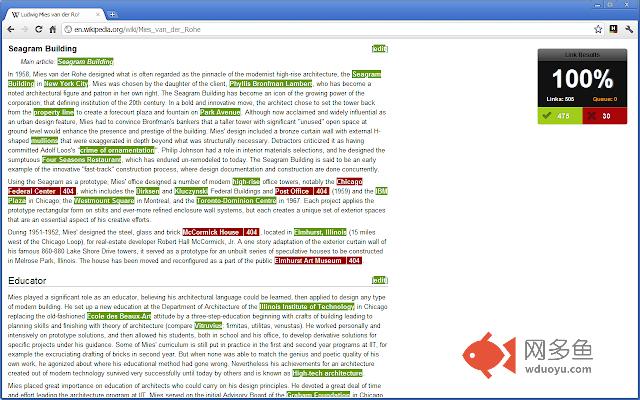
插件概述
Check My Links is a link checker that crawls through your webpage and looks for broken links.插件详情
'Check My Links' is an extension developed primarily for web designers, developers and content editors.When you're editing a web page that has lots of links, wouldn't it be handy to be able to quickly check that all the links on the page are working ok? That's where 'Check My Links' comes in.
'Check My Links' quickly finds all the links on a web page, and checks each one for you. It highlights which ones are valid and which ones are broken, simple as that.
You can copy all bad links to your clipboard with one click!
HTTP response codes and full URLs of broken links are published in the Console log (Found in: 'Chrome > Tools > Javascript Console' or Ctrl+Shift+J).
Comments and feedback are welcome both here and directly to me on Twitter (@chasers).
UPDATES
Version 3.8: Copy to console will now mainly copy to your clipboard (it also still copies to your console just in case).
Version 3.7: Now works with local files, bug fixes, copy tweaks, general spring-cleaning (thanks to kyleladd, njablonski, tbrandles, pbx, iamdevelish for this release).
Version 3.6: Added optional 'warnings' for empty href attributes, trailing #s and anchor tags. Also, invalid links can now be dumped into the console in CSV format for export (many thanks to Kyle Ladd for this stuff).
Version 3.5.1: Sets 'noFollow' default to false on first run & checks for existence of either ID or Name attributes on pages linked to using URL fragments.
Version 3.5: Optionally check rel="nofollow" links, anchor links are now also validated, GET is now the default request method and you can now close the report box and re-run the checking process multiple times without any weirdness.
Version 3.4: You can now optionally cache valid links (green coloured, HTTP 200). This means the extension will always consider them valid each time you run the checking process, and therefore check only the red (broken) links each time... making page checking A LOT faster (many thanks to Kyle Ladd for this feature).
Also, you can click on the cache and method links on the page to quickly get to the options page (allowing you to change the HTTP method and caching settings quickly).
The extension also doesn't render multiple times on the page when re-clicking on the extension button.
Version 3.3.4: Now allows you to check links in a local file (note this requires the 'Allow access to file URLs' checkbox to be ticked in the Chrome extensions screen).
Version 3.3: Bugfixin'
Version 3.2: Added the option to choose the HTTP Request Type (HEAD or GET).
Version 3.1.2: Fixed blacklist (on the options page) not saving.
Version 3.0: You can now add the exclusion list, allowing you manually set URLs you don't want to be indexed (see the options page for the extension).
Version 2.3: Skips links when link relation (rel) attribute set to "nofollow"
Version 2.2: Skips Google Adsense links
其他信息
官方唯一标识:ojkcdipc****************njflfglf
官方最后更新日期:2019年3月5日
分类:开发者工具
大小:160KiB
版本:3.8.0
语言:English
提供方:pagemodified.com
星级:4.2
插件下载
| 下载链接一 下载链接二 |
| Chrome插件离线安装教程 |
温馨提示
本站中的部份内容来源网络和网友发布,纯属个人收集并供大家交流学习参考之用,版权归版权原作者所有。
如果您发现网站上有侵犯您的知识产权的作品,请与我们取得联系,我们会及时修改或删除。
如果您觉得网多鱼对您有帮助,欢迎收藏我们 Ctrl+D。