AskBlocker
插件截图
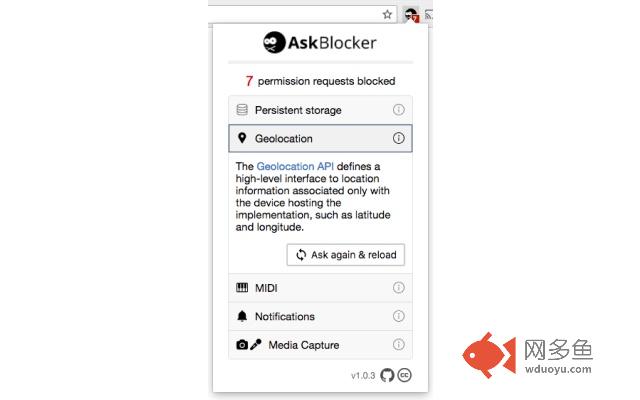
插件概述
Blocks overly-eager permission requests for notifications, location, etc. For example, before you've interacted with the page.插件详情
Block overly-eager permission requests for notifications, location, etc. For example, ones that happen before you've interacted with the page. This was created as part of How to improve your permissions UX (https://adamlynch.com/improve-permissions-ux).How it works:
Permissions requests are blocked until you've interacted with the page; i.e. click, tap, or key press. Although there are the following exceptions:
- If the permission has been previously requested and granted (or explicitly denied).
- If the domain is `localhost` or `127.0.0.1`.
- If you've navigated to the current page from another page on the same domain.
Things not covered and why:
- Accelerometer, gyroscope, magnetometer, device motion, device orientation, etc. They don't trigger a permissions request popup.
- Ambient light sensor. It doesn't trigger a permissions request popup.
- Bluetooth. This can only be requested due to user interaction anyway (https://webbluetoothcg.github.io/web-bluetooth/#requestDevice-user-gesture).
- Clipboard. It doesn't trigger a permissions request popup.
- Flash. I don't know how the prompt is triggered or how I can intercept this.
- Geolocation's `watchPosition` method. There's no way to achieve this without breaking stuff. It returns an ID and it doesn't offer any way to check the status of the permission, like `Notification.permission`. The Permission API could be used but it's asynchronous (Promise based), so there's no way to use it and also still return the ID.
- Web USB. Not really supported yet (and the Permission API doesn't support it yet), so it probably won't be annoying anyone.
其他信息
官方唯一标识:eelfgnmg****************abnfknho
官方最后更新日期:2018年3月4日
分类:开发者工具
大小:56.31KiB
版本:1.0.7
语言:English
提供方:adamlynch.com
星级:5
插件下载
| 下载链接一 下载链接二 |
| Chrome插件离线安装教程 |
温馨提示
本站中的部份内容来源网络和网友发布,纯属个人收集并供大家交流学习参考之用,版权归版权原作者所有。
如果您发现网站上有侵犯您的知识产权的作品,请与我们取得联系,我们会及时修改或删除。
如果您觉得网多鱼对您有帮助,欢迎收藏我们 Ctrl+D。