AEM Developer
插件截图
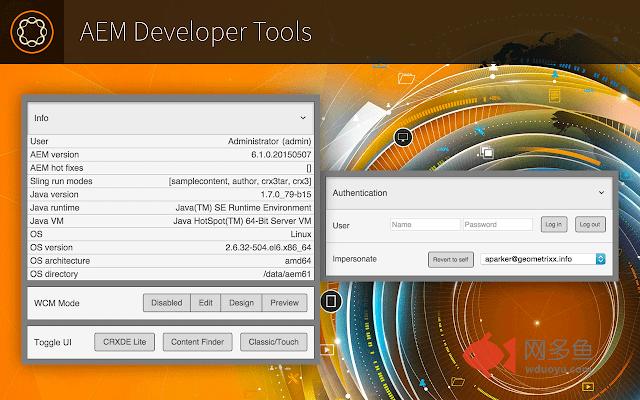
插件概述
Tools for AEM developers.插件详情
aem-developer-chrome====================
Chrome extension for AEM developers.
A collection of tools and links to help the daily AEM developer work a little faster. It's a work in progress. Please feel free to provide feedback on my little side project.

Adobe Experience Manager aem versions 6.0, 6.1 and 6.2 +.
General Info
------------
+ You can open links in the current Chrome tab simply by clicking on the links.
+ You can open the same links in a new Chrome tab by clicking on the 'external link' icon that appears to the right of the link.
+ A green response means that the operation was successful.
+ A red response means that the operation failed.
+ A yellow response means that the operation was successful but no action was needed (i.e. there were no compiled clients to delete)
Info
----
Provide information on the user, Sling, Java, and the OS. This is dependent on two logins, AEM and Felix, and the information will only show if you are logged in.

Environments
---------------
Open the current page in any of your predefined environments. Click 'edit' to add, remove, or update saved environments. Updates are immediately saved. '+' to add and '-' to remove entries. Click 'Done' to exit editing mode.
Click the icon next to the text to open the environment in a new browser tab.


Compare
---------------
Compare the current page to the same page in any environment. Toggle between showing only the difference or the entire node structure.

Impersonate
-----------
Impersonate users without having to go to the User Admin page. In addition, impersonating a user from this extension will simply reload the current page as that user. Click 'Revert to self' to end impersonation. If your current account doesn't have permission to impersonate, the dropdown will be empty.

Clear Cache and Memory
--------------------
Delete compiled clientlibs under the /var/clientlibs directory. Delete compiled JSP files under the /var/classes directory. Run the Garbage Collector without going to the Felix console.

Toggle UI
--------------------
Toggle Content Finder on and off. If you are in a Touch UI view, you will be taken to the classic view with Content Finder. Toggling between Classic and Touch UIs works in siteadmin/sites.html, publishingadmin/publications.html, damadmin/assets.html, welcome/projects.html, and normal view/editor.html. Unexpected redirects may happen if you are on a page that doesn't have a Touch/Classic equivalent.

Todo:
-----
+ Performance: extension starts too slow.
+ Remove jQuery from popup.js.
+ Chrome doesn't currently support HTML5 datalists in extensions, use when available.
+ Comparison should show reordering of nodes.
+ Comparison should have view as well.
+ Setup dev process: Grunt, Bower, SASS/LESS, build/zip/version, minification, concatenation, etc...
+ Improve UI Toggle for pages that don't map between Touch and Classic.
+ Test in AEM versions below 6.
其他信息
官方唯一标识:hgjhcngm****************cmohfmfc
官方最后更新日期:2017年1月11日
分类:开发者工具
大小:163KiB
版本:0.3.8
语言:English (United States)
提供方:nateyolles.com
星级:4.6
插件下载
| 下载链接一 下载链接二 |
| Chrome插件离线安装教程 |
温馨提示
本站中的部份内容来源网络和网友发布,纯属个人收集并供大家交流学习参考之用,版权归版权原作者所有。
如果您发现网站上有侵犯您的知识产权的作品,请与我们取得联系,我们会及时修改或删除。
如果您觉得网多鱼对您有帮助,欢迎收藏我们 Ctrl+D。