Twitch Chat Helper
插件截图
插件概述
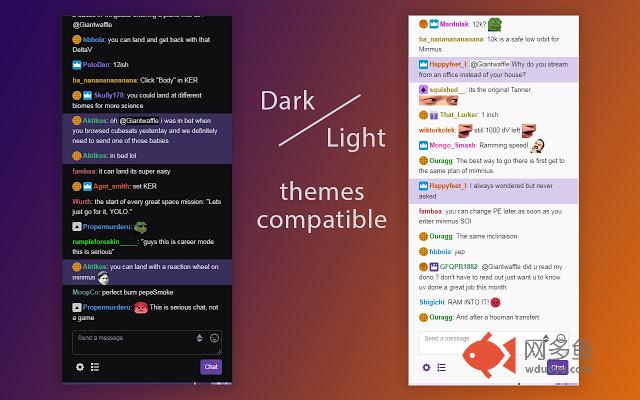
Allows to highlight chat messages of selected user, change chat font size and more.插件详情
✔ FEATURES:• highlight and track twitch user's chat messages
• change chat font size
• see amount of user's messages in chat without scrolling
• get notification sound when tracked user posting new message
Have you ever tried to find chat message that someone responded to? Or to find someone's previous chat messages to follow ongoing conversation? This extension allows you to do it very easily.
✔ HOW TO USE:
• To track mentioned user click on his @mention (username with leading @ sign) in chat.
• To track message's author hold ALT key and click one of his messages (next Alt+Click would cancel tracking).
• To track user without finding him in chat, click on extension icon (top right of your browser window) and enter his username into input field.
When tracking starts, track-bar at the bottom of the chat will appear. Small scroll bar in it will represent visible chat area (scroll chat a bit to get the gist). Message markers on it will represent tracked user's messages. Change color scheme of track-bar and highlighted messages in extension settings (last 2 schemes would be more appropriate for twitch in dark mode).
✔ KEYBOARD HOTKEYS:
Alt + S - cancel tracking
Alt + W - toggle focus on chat input field
Alt + Q - open extension's settings popup
Ctrl + Enter - toggle fullscreen
If you found any bugs or have suggestion on how to improve extension functionality feel free to contact me at dmitriy.zhura@gmail.com
其他信息
官方唯一标识:fdecmpcj****************pgfiaoch
官方最后更新日期:2019年7月7日
分类:社交与通讯
大小:382KiB
版本:1.2
语言:English
提供方:none
星级:5
插件下载
| 下载链接一 下载链接二 |
| Chrome插件离线安装教程 |
温馨提示
本站中的部份内容来源网络和网友发布,纯属个人收集并供大家交流学习参考之用,版权归版权原作者所有。
如果您发现网站上有侵犯您的知识产权的作品,请与我们取得联系,我们会及时修改或删除。
如果您觉得网多鱼对您有帮助,欢迎收藏我们 Ctrl+D。