Tel Linker
插件截图
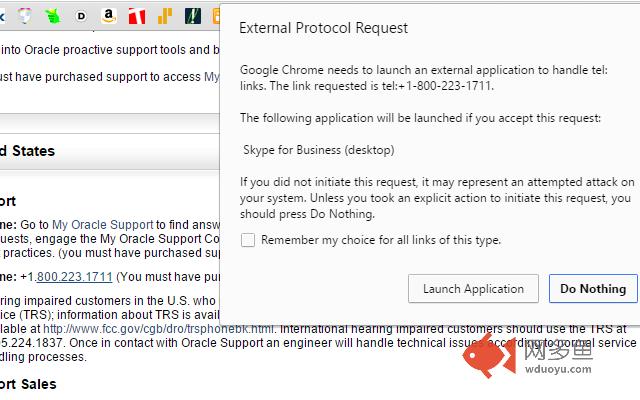
插件概述
Locates telephone numbers on a page and converts them into clickable links.插件详情
By default, the extension only supports U.S. phone numbers, however users can add custom matching Regular Expression. I recommend testing your regex at https://regex101.com/. When formatting the links, the groups are filled in using {#}. If the regex test showing matching group 1 is 67, then {1} will be replaced with 67. {0} will always replace with the originally matched string.Keep in mind that in order to use this extension you must have software which can bind on your protocol of choice (see windows default programs, default programs by protocol)! Applications like Cisco Jabber, Skype, VerticalWave Dialer, etc. Either that or you have to have a phone system that supports some kind of http/https dialing, ie: http://callsystem.mycompany/call?number={1}{2}{3}
When matching phone numbers, it will provides 4 replacement variables for you to work with. {0} translates to the original number, in its a original state. {1} is the area code, {2} is the 3 digit part, and {3} is the four digit part.
EG: (555) 666-7777
{0} = (555) 666-7777
{1} = 555
{2} = 666
{3} = 7777
The default settings create a tel link, formatted as +1-555-666-7777, without changing the actual displayed text. If you need to use something other than tel, would like a different format, or need another dial out code, just change it in options! I would recommend that you not use the {0} replacement for the actual Tel Link portion, simply because some websites have decided to use 'pretty' formatting on their phone numbers, ie: 555.666.7777. Using periods in a phone number, for most phone clients, is not valid. The standard is to use either dashes to separate the numbers ({1}-{2}-{3}) or to simply have no separation ({1}{2}{3}).
If for some reason the extension misses a phone number, you can also try selecting the phone number and right clicking to use the context menu option. It will still try and apply the matching standards on the number just in case the issue was related to some odd DOM circumstance; if it can't match a phone number, it will simply parse out whatever protocol you've set and stick it in front of whatever you have highlighted.
You can also choose to mark either a single page or an entire domain as 'filtered', meaning Tel Linker will not find and replace phone numbers for that page/domain. To do so, just click the phone icon to the right of your address bar, and choose the option you prefer. To re-enable Tel Linker for the domain/page, just repeat the process, or go to the extension options and remove the domain/page from the filtered list.
If you run into any glitches, or have any suggestions, feel free to comment about it; I like to tinker with things in my spare time!
其他信息
官方唯一标识:ceiihmdn****************fhhbgodj
官方最后更新日期:2019年2月5日
分类:社交与通讯
大小:16.08KiB
版本:0.5.3
语言:English
提供方:none
星级:4.6
插件下载
| 下载链接一 下载链接二 |
| Chrome插件离线安装教程 |
温馨提示
本站中的部份内容来源网络和网友发布,纯属个人收集并供大家交流学习参考之用,版权归版权原作者所有。
如果您发现网站上有侵犯您的知识产权的作品,请与我们取得联系,我们会及时修改或删除。
如果您觉得网多鱼对您有帮助,欢迎收藏我们 Ctrl+D。