Storify
插件截图
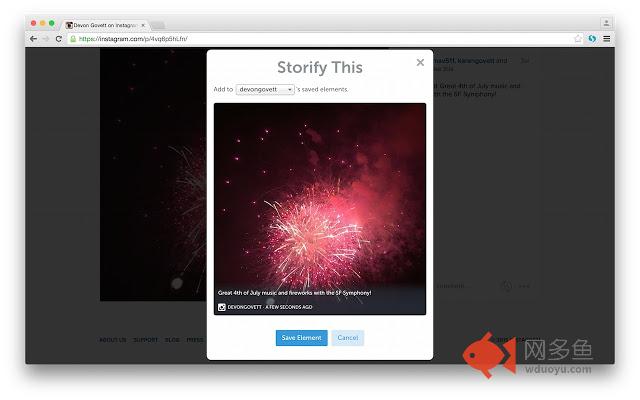
插件概述
Official Storify.com Chrome Extension - create social media stories插件详情
Official Storify.com Chrome Extension - create social media stories* NOTE: You need a Storify account to use this extension. If you don't have a Storify account, please visit Storify.com *
Storify is the best way to tell stories online. The Storify Chrome Extension enables you to easily collect media for your stories while browsing across the entire web.
* After the Storify plugin is installed, many popular web sites such as Twitter and Facebook will have “Storify” buttons activated that allow you to easily collect links to media, including text, photos or video.
* You can grab an image by right-clicking on it and selecting “Storify this image”
* You can grab a link by right-clicking on it and selecting “Storify this link”
* You can also select text on any web page and right-click to “Storify this selection,” creating a beautifully formatted quote that links back to the original source.
After Storifying a media element, you can save it in your saved elements. To later find your collected media inside Storify’s editing dashboard, look under the right side “Media” tab and select the Storify source with the blue “S” logo, and then look under “saved elements.” Drag and drop the media you need from there directly into your story!
其他信息
官方唯一标识:oonhlodh****************eagjnnop
官方最后更新日期:2015年9月30日
分类:社交与通讯
大小:130KiB
版本:0.8.1
语言:English
提供方:storify.com
星级:3.7
插件下载
| 下载链接一 下载链接二 |
| Chrome插件离线安装教程 |
温馨提示
本站中的部份内容来源网络和网友发布,纯属个人收集并供大家交流学习参考之用,版权归版权原作者所有。
如果您发现网站上有侵犯您的知识产权的作品,请与我们取得联系,我们会及时修改或删除。
如果您觉得网多鱼对您有帮助,欢迎收藏我们 Ctrl+D。