Shazify
插件截图
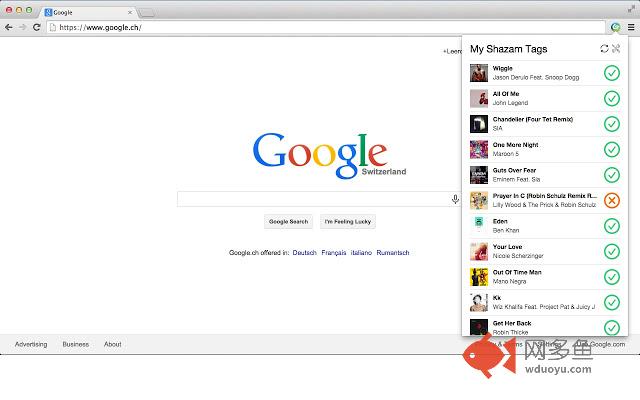
插件概述
Easily sync your Shazam tracks with a Spotify playlist插件详情
(Shazify was previously named Shazam2Spotify)Easily sync your Shazam tracks with a Spotify playlist, in just a few clicks !
UPDATE: Shazam pushed a new update the 10th December 2014 with support for syncing your tracks to Spotify. You can find more information here : https://support.shazam.com/hc/en-us/articles/202911263-Latest-Update-Information-What-s-new-. If it's available for you, you should use it instead of this extension.
It will only works if you use the Shazam app for iOS or Android AND you are logged in with Facebook in the app.
If these conditions are met, Shazam will sync your tags with their MyShazam service (www.shazam.com/myshazam).
This extension will then parse the MyShazam website, get your tags, and add them to a new playlist created on your Spotify account.
How it works :
1) Install the extension
2) Click on the new icon appeared on your Chrome toolbar
3) You will be asked to login on MyShazam and Spotify
4) A new playlist ("My Shazam Tags") will be created on your Spotify account
5) Your Shazam tags will be listed and automatically added to this playlist
If a Shazam tag cannot be found on Spotify, you will have the possibility to change the search query for this track.
When you want to update your Spotify playlist with new tags, simply click on the Shazify icon on Chrome toolbar. It will then search for new tags on Shazam and add them to Spotify.
This is an open source project, feel free to contribute !
https://github.com/leeroybrun/chrome-shazify
Shazify is not affiliated with Shazam Entertainment Limited.
"Shazam" and its logo are trademarks and registered trademarks of Shazam Entertainment Limited.
All other companies and product names are trademarks or registered trademarks of their respective companies.
其他信息
官方唯一标识:ncdhendb****************ndoebhan
官方最后更新日期:2019年6月3日
分类:社交与通讯
大小:1.0MiB
版本:0.4.7
语言:支持2种语言
提供方:https://leeroybrun.github.io/shazify-website
星级:3.3
插件下载
| 下载链接一 下载链接二 |
| Chrome插件离线安装教程 |
温馨提示
本站中的部份内容来源网络和网友发布,纯属个人收集并供大家交流学习参考之用,版权归版权原作者所有。
如果您发现网站上有侵犯您的知识产权的作品,请与我们取得联系,我们会及时修改或删除。
如果您觉得网多鱼对您有帮助,欢迎收藏我们 Ctrl+D。