Sendroid
插件截图
插件概述
Easily share text or link from browser to android device.插件详情
Sendroid helps you to easily send selected text or link right from your browser to your android device. You can share the received content directly from notification with your favourite sharing app.There are so many apps that can do that. What is special about this one?
* Sendroid is simple. You don’t even have to open the extension or android app after initial configuration.
* You can pair a maximum of 4 android devices to receive text or link from your browser
* Sendroid doesn’t store your data. Doesn’t ask you to login or sign-up.
* No spamming. You receive only what you share from your browser.
* Send text or links to your android device with a simple right click on your browser in PC.
All you need to do is install the Sendroid application on your android device (Google Play Store link : https://play.google.com/store/apps/details?id=com.atekihcan.sendroid)
Setting up Sendroid Android App
* Install Sendroid on your android device.
* Open Sendroid and it will automatically generate a registration ID for you.
* Mail the registration ID to yourself. Later you will need it to pair your browser and android device.
* Or you can copy the registration ID and use some other channel to get it on your PC.
* You are good to go! Received text or links from your browser will show up in the notification panel.
* Visit settings to turn on/off automatic copying, setting default sharing app etc.
Setting up Sendroid Browser Extension
* Install Sendroid extension on Google Chrome.
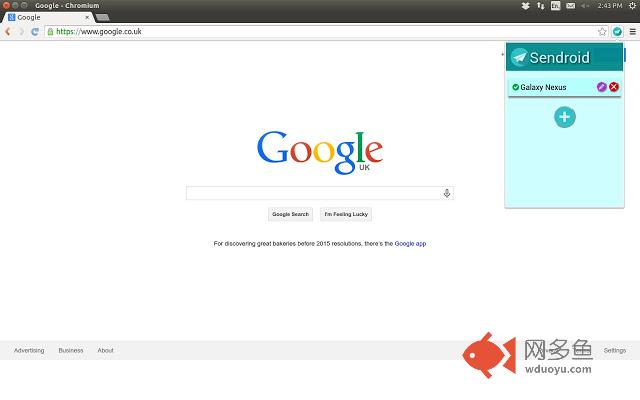
* Click the Sendroid icon on the menu bar (top-right corner) of your browser to Sendroid settings panel.
* Click the add button on the Sendroid settings panel.
* Give your device a name and paste the registration ID you got from the Sendroid android app.
* Save your device.
* Go ahead! Right click and send text/links to your added device!
For more information visit : http://atekihcan.github.io/Sendroid/
What's New in 1.0.2
* Fixed device list not retaining on browser restart
* Fixed device list not showing up in context menu after restart
其他信息
官方唯一标识:pkgpcjak****************dgifneai
官方最后更新日期:2014年12月30日
分类:社交与通讯
大小:118KiB
版本:1.0.2
语言:English (United States)
提供方:atekihcan.github.io
星级:4.2
插件下载
| 下载链接一 下载链接二 |
| Chrome插件离线安装教程 |
温馨提示
本站中的部份内容来源网络和网友发布,纯属个人收集并供大家交流学习参考之用,版权归版权原作者所有。
如果您发现网站上有侵犯您的知识产权的作品,请与我们取得联系,我们会及时修改或删除。
如果您觉得网多鱼对您有帮助,欢迎收藏我们 Ctrl+D。