Sender Intelligence
插件截图
插件概述
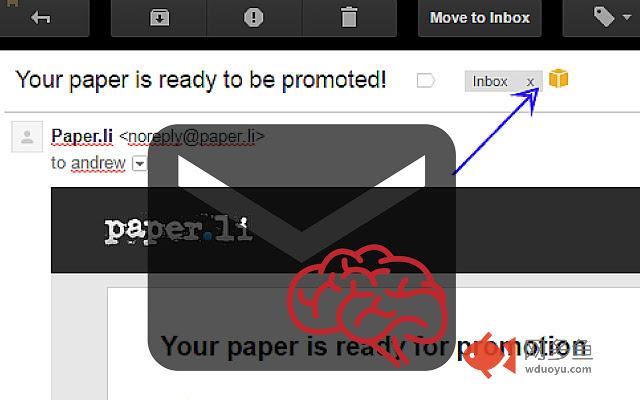
Identify which email service provider sent bulk email to Gmail. A small icon will appear clicking provides you more info.插件详情
This extension to Chrome allows you to identify the email service provider that delivered the email messages to your Gmail account, that company will be providing the tracking of your email to the company or brand that sent the message.When you open an email the extension checks to see if the message was sent using the infrastructure of one of a number of known email providers.
You can now easily identify if the email messages was sent from Mailchimp, Campaignmonitor or Salesforce for example.
When sending infrastructure has been identified an icon appears next to the subject line. Clicking that will take you to more information about the send service that delivered the email. Links to their website, their privacy policies and anti-spam policies. We also provide email contacts for the service provider themselves so you can contact directly if you need to make a complaint.
You are also able to leave public feedback about the vendor based on the types of message you have seen from them, directly on the SenderIntelligence website.
其他信息
官方唯一标识:pfgcjiod****************jfaleapj
官方最后更新日期:2016年3月25日
分类:社交与通讯
大小:111KiB
版本:3.1.9
语言:English
提供方:https://emailexpert.org
星级:4.3
插件下载
| 下载链接一 下载链接二 |
| Chrome插件离线安装教程 |
温馨提示
本站中的部份内容来源网络和网友发布,纯属个人收集并供大家交流学习参考之用,版权归版权原作者所有。
如果您发现网站上有侵犯您的知识产权的作品,请与我们取得联系,我们会及时修改或删除。
如果您觉得网多鱼对您有帮助,欢迎收藏我们 Ctrl+D。