SA Needful
插件截图
插件概述
Performing CPR on the Something Awful forums插件详情
Features:• Quick reply
• Livestream mode - hitting this button turns the thread into infinite scroll mode and it will automatically add new posts every 7 seconds. Also gives you the ability to overlay a video on the screen with the options to move, resize and change the transparency of it - allowing you to see realtime updates of the thread along with easily watching a stream
• Upload images to Imgur by dragging and dropping them into the reply box, or by right click pasting a copied image. The image will then be uploaded and the Imgur link (wrapped in IMG tags) will be placed in the text box at the location of your cursor
• Highlights posts you have been quoted in
• Lazyload images - saves bandwith and time on huge threads with tons of images
• Favourite forum category - add your favourite forums to the category at the top, if you only visit a handful of places then this would be really useful
• Embed vine and webm video - any webm url in a post will be embedded with sound turned off by default, set to autoplay and set to loop
• Keyboard shortcuts - A/D keys to navigate back/forward thread page respsectively
• Emptyquote button
• Tweet embed - links to Tweets are now turned into a fully interactive embed of the tweet. It is then cached so that if it is deleted on Twitter then it will still display on the forums when you refresh the page etc
• Quick toggle hide/show avatars - Just click on any avatar and it will hide all avatars on the page. Similarly, click the same area/a posters username to bring all the avatars back. This does NOT stop the avatars from loading
• Option to automatically tick the post signature box
• Hide forum categories - If you never use GBS, FYAD or BYOB then just click on the "Main" bar above those forums and it will hide the Main forums, for example
• Subforum tree layout - this is a work in progress, its now turned off by default
• Favourite Smilies - on the smilie page you can store your favourites at the top of the page, just click and drag on a smilie box and drop it on top of any other smilie box. To remove one from your favourites, similarly pick it up from the favourites section and drop it on another smilie
• Forum dependant word filters
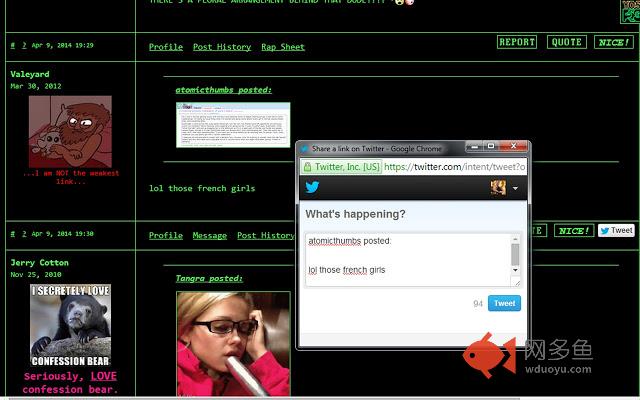
• Tweet your post - hitting it brings up a tweet with your post text ready to go, lol
You can toggle options in the popout menu by hitting the little Yos+ button on the right hand side of the address bar
其他信息
官方唯一标识:bipfbhac****************abepbekm
官方最后更新日期:2018年1月2日
分类:社交与通讯
大小:1.19MiB
版本:1.9987
语言:English (United States)
提供方:none
星级:4.6
插件下载
| 下载链接一 下载链接二 |
| Chrome插件离线安装教程 |
温馨提示
本站中的部份内容来源网络和网友发布,纯属个人收集并供大家交流学习参考之用,版权归版权原作者所有。
如果您发现网站上有侵犯您的知识产权的作品,请与我们取得联系,我们会及时修改或删除。
如果您觉得网多鱼对您有帮助,欢迎收藏我们 Ctrl+D。