Right Click to Dial - SIP Dialer
插件截图
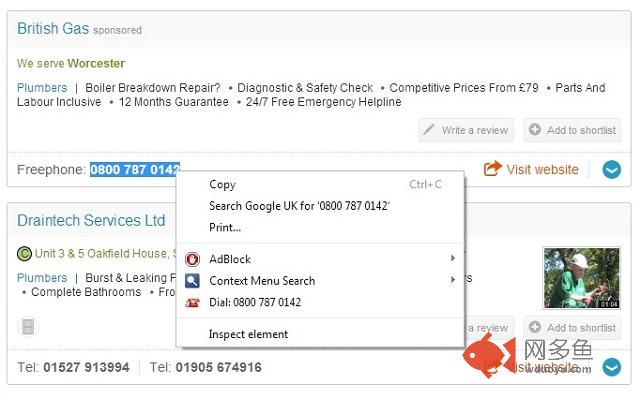
插件概述
Simple right click to dial for Chrome context menu插件详情
Enables users with SIP dialing programs do right click and dial from Chrome. Installs a link in the context menu (or right click menu) of chrome. Just select the text, Right Click to Dial and your Sip software will do the rest.Great for Gigaset Quicksync phones. Any feedback greatly appreciated, its my first Extension so be kind!
Windows users will need to do the following:
Step 1.
Download "Ian Sharp's" DialV4Beta1.zip found here: http://www.atrandom.iansharpe.com/phone-dial.php Extract dial.exe into the following folder. C:\Program Files\Dial\ Check to see if msvcr100.dll is located in C:\Windows\System32 If this file exists, move to Step 2. If the files does not exists, copy this file from the extracted files into C:\Windows\System32 directory and then move to Step 2.
Step 2. Using Note Pad, Create a file called sip.reg and copy the following lines into the file.
Windows Registry Editor Version 5.00
[HKEY_CLASSES_ROOT\sip]
"EditFlags"=hex:02,00,00,00
@="URL:Sip Protocol"
"URL Protocol"=""
[HKEY_CLASSES_ROOT\sip\shell]
[HKEY_CLASSES_ROOT\sip\shell\open]
[HKEY_CLASSES_ROOT\sip\shell\open\command]
@="\"C:\\Program Files\\Dial\\dial.exe\" \"%1\""
This creates the link between the Chrome Extension and Dialer.exe present in Windows 7.
其他信息
官方唯一标识:nfhpohea****************odfgmale
官方最后更新日期:2014年4月24日
分类:社交与通讯
大小:25.25KiB
版本:0.2
语言:English (United States)
提供方:none
星级:3.6
插件下载
| 下载链接一 下载链接二 |
| Chrome插件离线安装教程 |
温馨提示
本站中的部份内容来源网络和网友发布,纯属个人收集并供大家交流学习参考之用,版权归版权原作者所有。
如果您发现网站上有侵犯您的知识产权的作品,请与我们取得联系,我们会及时修改或删除。
如果您觉得网多鱼对您有帮助,欢迎收藏我们 Ctrl+D。