OpenScape Fusion
插件截图
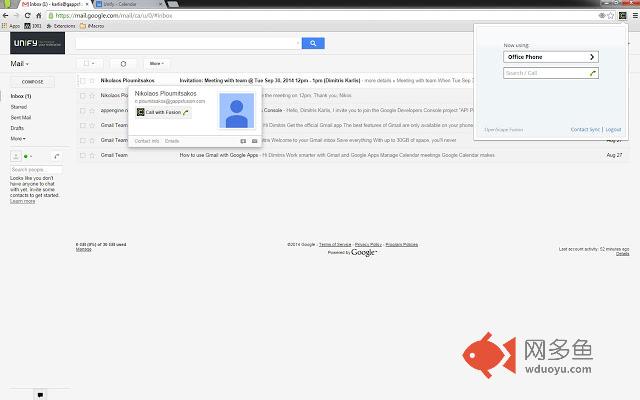
插件概述
A better way to communicate fromyour Google Apps™.
Business is about relationships and relationships start with a conversation.…
插件详情
A better way to communicate fromyour Google Apps™.
Business is about relationships and relationships start with a conversation.
Conversations that improve productivity, responsiveness, collaboration, and communications efficiency.
And that is what this extension
is designed to do.
Our OpenScape Fusion for Google Apps™ extension provides easy access to all your communications, directly from your Google Apps™, helping you benefit from the following features and capabilities:
• One Number Service – publish only one number and be reached from anywhere
• Click-to-dial – quick access to people when you need them
• Contact synchronization – easy access to both your OpenScape and Google Apps Contacts™
• Device management – choose any device and your calls will follow
• Audio and web conferencing – efficiently collaborate with other team members
The OpenScape Fusion for Google Apps™ extension is easy to configure and install
and is pre-built into the OpenScape UC Application at no additional charge.
For more information about OpenScape
visit us at: www.unify.com
Unify is one of the world’s leading communications software and services firms, providing integrated communications solutions for approximately 75 percent of the Fortune Global 500.
Our solutions, including Circuit, unify multiple networks, devices and applications into one easy-to-use platform that allows teams to engage in rich and meaningful conversations.
The result is a transformation of how the enterprise communicates and collaborates that amplifies collective effort, energizes the business, and enhances business performance.
Unify has a strong heritage of product reliability, innovation, open standards and security.
Unify is an Atos company.
其他信息
官方唯一标识:cggeicak****************pfejhnid
官方最后更新日期:2017年7月24日
分类:社交与通讯
大小:567KiB
版本:1.0.29
语言:支持4种语言
提供方:www.unify.com
星级:4.6
插件下载
| 下载链接一 下载链接二 |
| Chrome插件离线安装教程 |
温馨提示
本站中的部份内容来源网络和网友发布,纯属个人收集并供大家交流学习参考之用,版权归版权原作者所有。
如果您发现网站上有侵犯您的知识产权的作品,请与我们取得联系,我们会及时修改或删除。
如果您觉得网多鱼对您有帮助,欢迎收藏我们 Ctrl+D。